Blog

  • Getimg.ai Review 2026: We Tested Its AI Image, Editing and Video Tools

    Disclosure: This article was produced in partnership with Getimg.ai. Getimg provided credits for us to test the platform, but the testing, observations and opinions in this review are our own.

    Getimg.ai has changed considerably from the AI image generator it started as.

    Today, it is an all-in-one creative AI workspace that brings image generation, video, editing, upscaling and audio tools together in one place. More importantly, it gives users access to models from several major AI companies without requiring them to move between separate platforms.

    That sounds useful in theory. But how well does it actually work?

    For this review, we tested Getimg hands-on across a complete creative workflow. We generated the same commercial-style image using several AI models, tested Getimg’s automatic model selection, edited an existing generation using a different model, and finally turned that edited image into a video with MiniMax H3.

    The results helped us understand where Getimg is genuinely useful — and where the all-in-one approach still involves trade-offs.

    What Is Getimg.ai?

    Getimg.ai is a multi-model AI creative platform founded in 2022 and based in the EU.

    Rather than building its entire experience around a single proprietary model, Getimg integrates models from multiple AI providers into one interface.

    The company currently says it has integrated 29+ leading AI models into its main creative platform, including models from providers such as Google, OpenAI, Black Forest Labs, MiniMax, Alibaba and ByteDance.

    The platform covers several types of creative work, including:

    • AI image generation
    • AI video generation
    • Image editing
    • Image and video upscaling
    • Background removal
    • Smart image resizing
    • AI music generation
    • Text-to-speech

    There is also a separate Getimg API for developers. At the time of writing, the API advertises 33+ production models from 7 providers, including 17 image models and 16 video models.

    The basic proposition is simple: instead of maintaining separate accounts and workflows across several AI services, you can access different models and creative tools from one workspace.

    Our Hands-On Getimg Test

    We wanted to test that proposition rather than simply list Getimg’s features.

    So we created a small product-photography workflow around a fictional futuristic coffee machine.

    For the image comparison, we used the same core prompt:

    A premium product photo of a futuristic silver coffee machine on a dark marble kitchen counter, soft morning light, realistic reflections, shallow depth of field. A small white card next to the machine clearly reads “AI TRAINING JOBS” in clean black typography. Ultra-realistic commercial photography.

    This gave the models several things to handle simultaneously: product realism, lighting, reflective materials, composition and, importantly, accurate text rendering.

    We then used the resulting assets for editing and video generation.

    Test 1: Getimg Auto Mode with GPT Image 2

    We started with Getimg’s Auto mode.

    Instead of choosing a model ourselves, we entered the prompt and allowed Getimg to decide which model should handle the request.

    Getimg selected GPT Image 2.
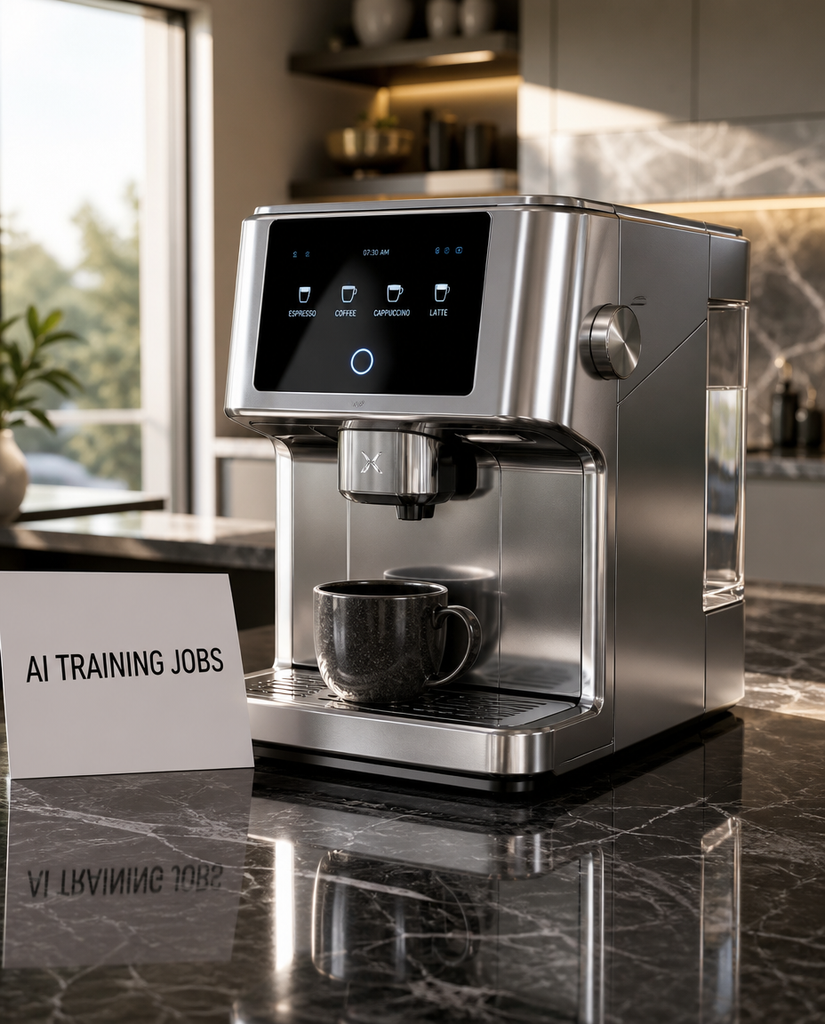
    Getimg Auto mode selected GPT Image 2 for our first product photography test.

    The first result was impressive.

    The coffee machine looked convincingly photorealistic, the metallic surfaces and reflections were handled well, and the overall composition resembled a polished commercial product photograph.

    More importantly, the requested “AI TRAINING JOBS” text appeared correctly on the card on the first attempt.

    Smaller text generated on the coffee machine’s own interface was less reliable, with some of the distortions that remain common in AI-generated imagery.

    But the primary text explicitly requested in our prompt was rendered correctly.

    Is Getimg Auto Mode Useful?

    For new users, Auto may be one of Getimg’s most useful features.

    One of the problems created by multi-model platforms is that model choice itself can become complicated. Giving users dozens of models doesn’t necessarily help if they don’t know which one is appropriate for a particular task.

    Getimg’s approach is to make that decision optional.

    Its Auto system can select the model and settings according to the requested task, while experienced users remain free to choose a model manually.

    In our first test, it worked well: GPT Image 2 was a sensible choice for a prompt involving photorealistic product imagery and accurate text.

    Tests 2–4: Comparing Getimg AI Image Models

    Next, we manually selected different image models and gave them the same core prompt.

    We tested:

    • Seedream 5.0 Pro
    • Nano Banana 2
    • Nano Banana Pro

    This wasn’t intended to be a scientific benchmark.

    Generative outputs naturally vary between runs, and individual models can support different settings, resolutions and output formats.

    Instead, we wanted to answer a more practical question: does switching models inside Getimg actually produce meaningfully different creative options?

    It does.

    Seedream 5.0 Pro

    Seedream 5.0 Pro interpretation of our coffee machine prompt.

    Seedream 5.0 Pro produced the most minimal interpretation of the product in our test.

    The lighting was attractive and the image had a clean, editorial quality. The coffee machine itself was considerably simpler than the versions generated by some of the other models.

    The requested text was recognizable, although its presentation was less prominent than in some of our other results.

    Overall, the result was aesthetically strong but noticeably different from the GPT Image interpretation.

    That is a good illustration of why model choice can matter even when the underlying prompt remains essentially unchanged.

    Nano Banana 2
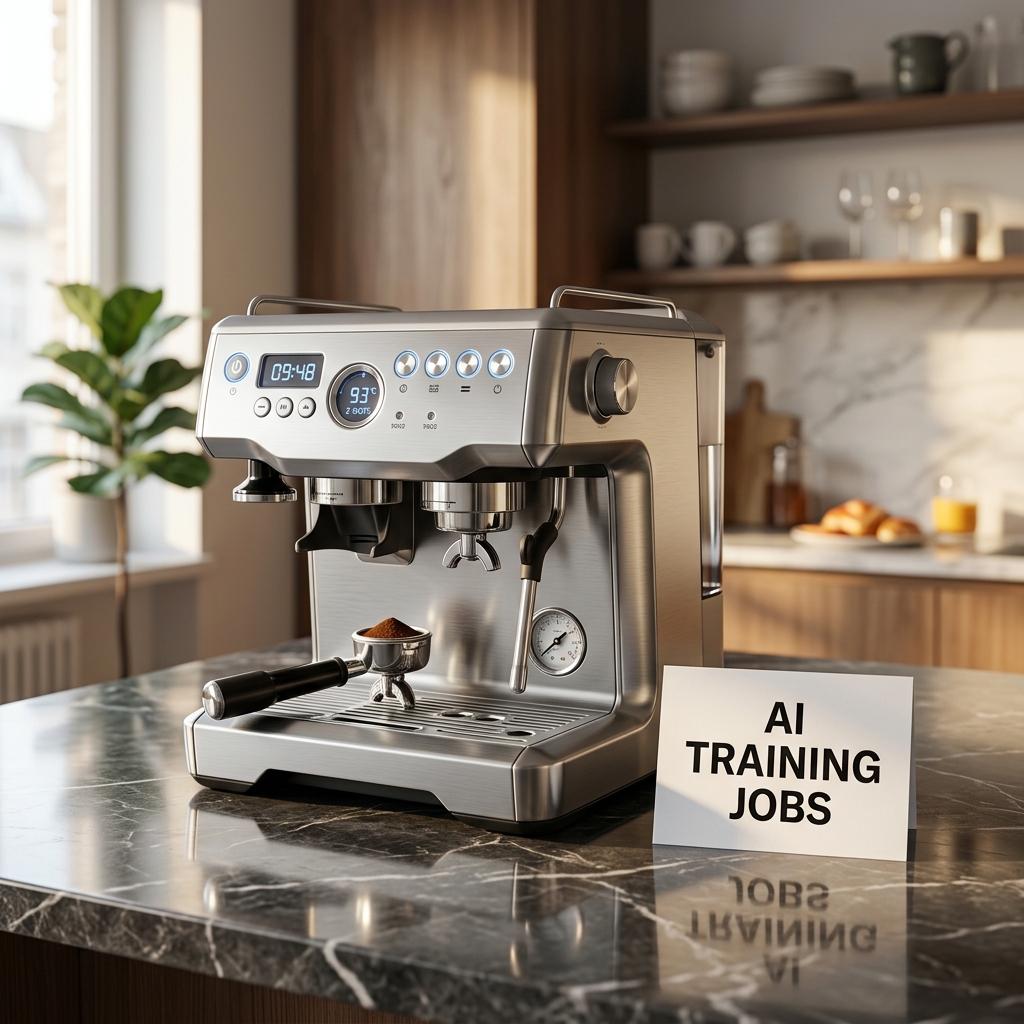
    Nano Banana 2 produced a more detailed interpretation of the same product photography prompt.

    Nano Banana 2 went in the opposite direction.

    Its coffee machine contained more controls, components and visual details, while the “AI TRAINING JOBS” text was rendered clearly and accurately.

    The scene also remained convincingly photorealistic.

    Some of the tiny interface details on the machine became less convincing when examined closely, but the primary requested text was excellent.

    Of the images we generated, this was one of our favorite results for this particular prompt.

    Nano Banana Pro
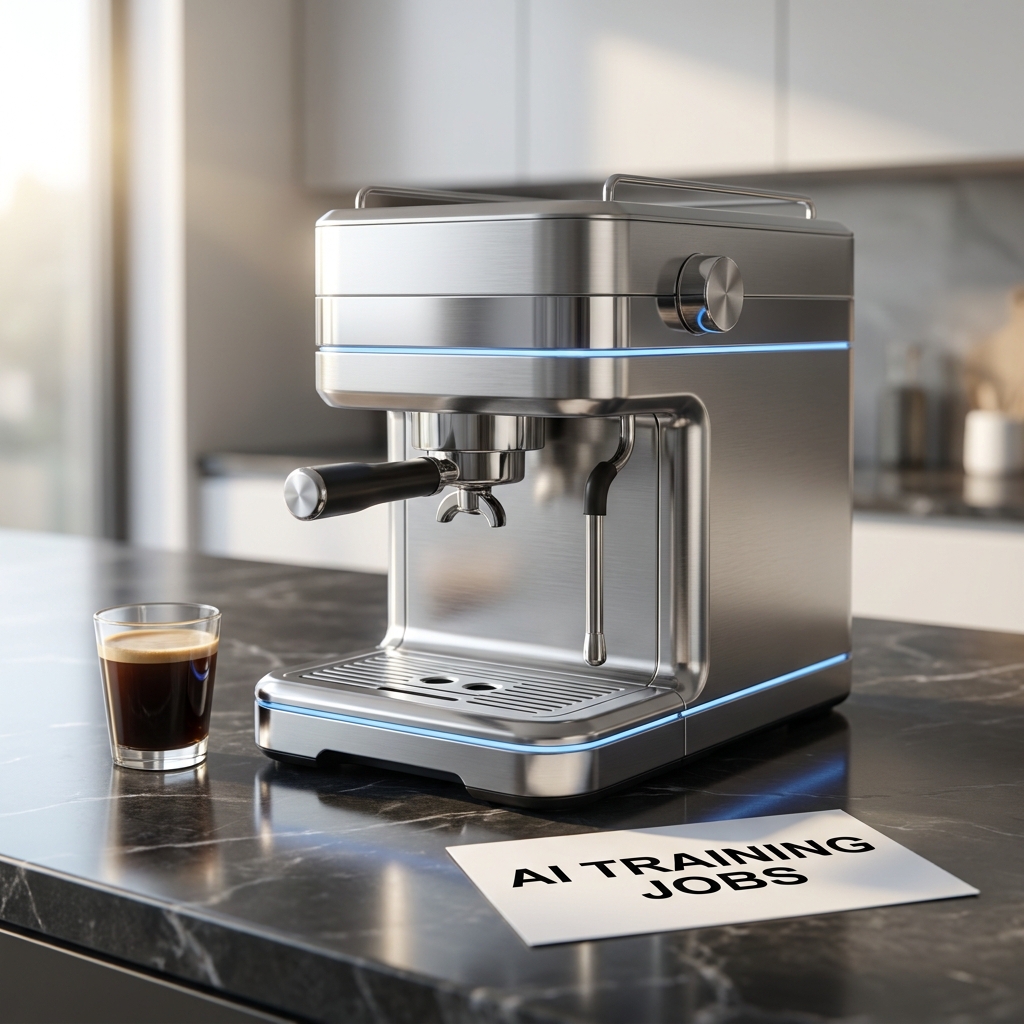
    Nano Banana Pro created a cleaner, more futuristic interpretation with excellent primary text rendering.

    Nano Banana Pro produced yet another interpretation.

    Its coffee machine was cleaner and more futuristic, with a minimalist metallic design and distinctive blue accent lighting.

    Text rendering was again excellent.

    Interestingly, we wouldn’t automatically say that the Pro result was better than Nano Banana 2 for this particular assignment.

    Nano Banana 2 produced a busier and arguably more interesting commercial product image, while Nano Banana Pro gave us something cleaner and more controlled.

    That distinction matters.

    A model with “Pro” in its name won’t necessarily produce the image you personally prefer for every prompt. Different models have different strengths, styles and interpretations.

    Being able to move between them easily is therefore more useful than simply having access to one supposedly “best” image model.

    Test 5: Editing a Nano Banana Pro Image with Nano Banana 2

    This was one of the most interesting parts of our test.

    Instead of starting again from scratch, we took our Nano Banana Pro image and used it as a reference for another generation.

    We asked Getimg to keep the coffee machine and the “AI TRAINING JOBS” card while transforming the bright kitchen into a stylish coffee shop at night.

    We also deliberately switched models, using Nano Banana 2 for the edit.

    Before
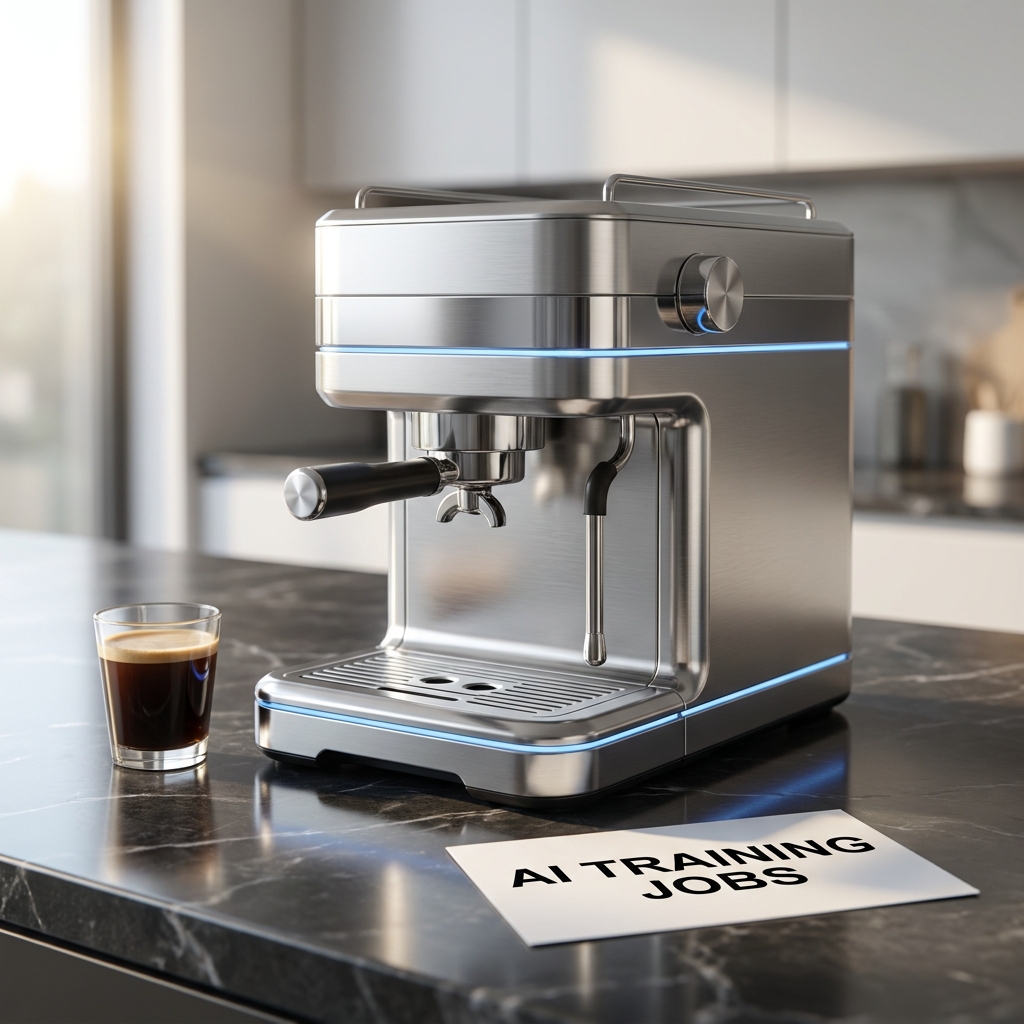
    Original image generated with Nano Banana Pro.

    After
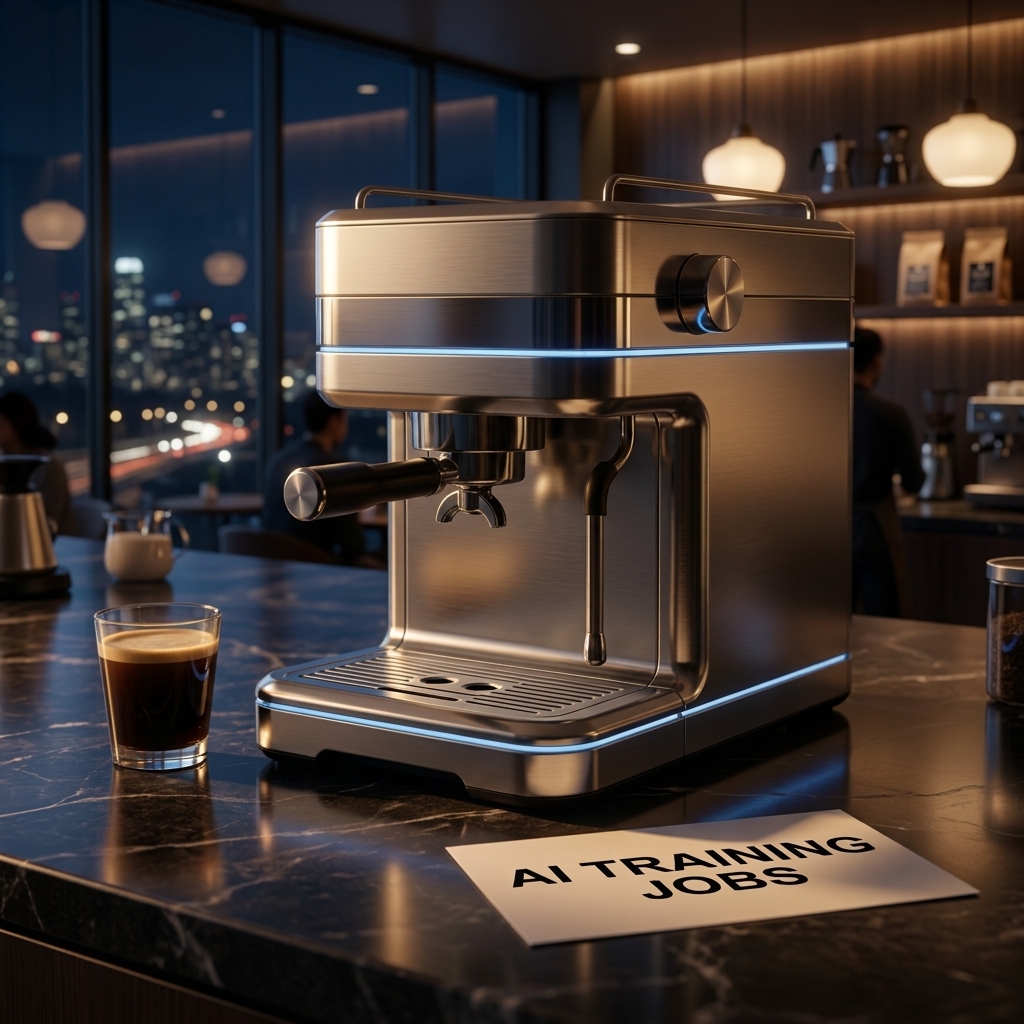
    The same concept after using the original image as a reference and editing it with Nano Banana 2.

    The result was excellent.

    The environment changed substantially. The bright daytime kitchen became a dark coffee shop with warm ambient lighting, large windows and city lights in the background.

    At the same time, the main product remained remarkably consistent.

    The overall design of the coffee machine, its large control knob, portafilter, metallic finish and blue accent lighting were retained. The card also remained in the composition, with “AI TRAINING JOBS” still clearly readable.

    The model didn’t simply replace the background.

    Lighting and reflections across the metallic product were also adapted to the nighttime environment, making the final image feel reasonably coherent as a complete scene.

    Why This Was Our Most Important Image Test

    This is where Getimg’s multi-model approach started to make more practical sense.

    We were no longer simply generating isolated images and comparing them.

    We had created an asset with one model and then continued working on it using another model inside the same platform.

    For actual creative work, that may be more important than which individual model wins a one-off image comparison.

    Test 6: Image-to-Video with MiniMax H3

    Finally, we took the edited nighttime image and turned it into a video.

    For this test, we manually selected MiniMax H3.

    We asked for a slow cinematic camera movement toward the coffee machine, subtle movement in the background and realistic reflections across the stainless-steel surface while preserving the product and the text.

    Our final image-to-video test using MiniMax H3 inside Getimg.

    The resulting clip was approximately five seconds long.

    The coffee machine remained surprisingly stable during the animation, without major structural deformation.

    Camera movement was controlled, while the changing reflections across the metal helped the result feel more like a short commercial product shot than a static image with artificial movement added on top.

    The “AI TRAINING JOBS” text also remained recognizable and readable.

    Preservation wasn’t pixel-perfect. Some elements of the original image were naturally reinterpreted as the frame was animated.

    But overall consistency was good.

    This completed a workflow that started with a simple text prompt and ended with a short product video — without leaving Getimg.

    The Real Strength of Getimg: Cross-Model Workflows

    After testing the platform, its biggest advantage became clearer.

    It isn’t simply that Getimg offers access to many AI models.

    Several platforms now aggregate generative AI models.

    What we found more useful was being able to move through a workflow like this:

    Prompt → Image Generation → Alternative Models → Image Editing → Image-to-Video

    During our test, we moved between GPT Image 2, Seedream 5.0 Pro, Nano Banana 2, Nano Banana Pro and MiniMax H3.

    The important part wasn’t simply being able to select those models from a menu.

    It was being able to continue working on the resulting assets inside the same environment.

    What We Liked About Getimg

    Access to Multiple Models Without Multiple Workflows

    Working directly with models from several different providers can mean using different websites, interfaces, subscriptions and credit systems.

    Getimg places multiple models behind a consistent interface.

    For creators who regularly switch between models, that is a meaningful convenience.

    Auto Mode Is Actually Useful

    Auto could easily have been a superficial feature.

    Our experience was more positive.

    For our first prompt, Getimg selected GPT Image 2 and immediately produced one of the strongest results of the test.

    At the same time, manual model selection remains available when you want more control.

    That gives Getimg a sensible balance between simplicity and experimentation.

    Cross-Model Editing Worked Well

    Our favorite workflow wasn’t the initial image generation.

    It was generating an asset with Nano Banana Pro, editing that asset with Nano Banana 2 and then animating the resulting image with MiniMax H3.

    That’s a much better demonstration of an all-in-one AI platform than simply displaying a long list of supported models.

    The Interface Is Straightforward

    Getimg doesn’t require users to construct complicated node-based workflows.

    The major creation tools are easy to find, including image generation, video generation, image and video upscaling, resizing, background removal, music and speech.

    That makes the platform approachable for creators who want to move quickly between tasks.

    What Could Be Better?

    Getimg doesn’t eliminate the limitations of the underlying generative AI models.

    We still encountered some familiar issues during testing.

    Small AI-Generated Text Can Still Be Unreliable

    Our main “AI TRAINING JOBS” text performed surprisingly well.

    However, some models independently generated small interface labels and controls on the coffee machine itself.

    Those tiny details weren’t always convincing and occasionally contained distorted or meaningless text.

    This varied by model, but it’s something worth checking carefully before using an AI-generated image as a final commercial asset.

    Credit Consumption Varies Significantly

    Getimg uses credits for generation, but a credit does not represent a fixed number of images or videos.

    Consumption varies according to the model, resolution and type of generation.

    That became particularly noticeable when moving from image generation to video.

    The interface shows the credit requirement for a generation, so users experimenting with premium models or video should pay attention to the cost before clicking Generate.

    This is especially important if you enjoy comparing several models against the same prompt.

    An All-in-One Platform Won’t Always Offer the Deepest Native Controls

    There is an unavoidable trade-off with platforms of this kind.

    If you use one specific AI model every day and need every advanced parameter or provider-specific feature available for that model, its native platform may sometimes provide deeper controls.

    Getimg’s advantage is different:

    breadth, convenience and workflow continuity across models.

    Which matters more depends on the way you work.

    Other Getimg Features

    Our hands-on testing focused primarily on image generation, image editing and image-to-video.

    Getimg also provides additional creative tools, including image and video upscaling, smart image resizing, background removal, music generation and text-to-speech.

    We didn’t test those tools extensively enough for this review to make claims about their output quality.

    That’s an important distinction: they expand what can be done inside the Getimg workspace, but our assessment in this review is based primarily on the workflows we actually tested.

    Getimg API for Developers

    Getimg also operates a separate developer API.

    At the time of writing, the API advertises:

    • 33+ production models
    • 7 model providers
    • 17 image models
    • 16 video models
    • 1M+ generations daily

    The image API includes models such as GPT Image, Nano Banana, Seedream, Qwen Image and others.

    The video API includes models from families such as Kling, Seedance, Wan, Grok Imagine and MiniMax.

    Instead of requiring a separate integration for every provider, developers can access these models through Getimg’s unified API.

    API pricing is separate from the consumer subscriptions and uses pay-as-you-go billing.

    Current API pricing starts from $0.015 per image and $0.022 per second of video, although actual prices vary significantly depending on the selected model, resolution and other settings.

    For individual creators, the API may not be particularly important.

    For agencies, startups and products that need to programmatically access several generative models, it substantially expands Getimg’s potential use cases.

    Who Is Getimg Best For?

    Based on our testing, Getimg makes the most sense for people who want to use multiple generative AI models rather than committing their entire workflow to one provider.

    It is particularly relevant for:

    • creators experimenting with different image and video models;
    • marketers producing visual and social content;
    • freelancers who don’t want separate workflows for every model;
    • e-commerce teams working with product imagery;
    • small creative teams;
    • developers looking for multi-model access through an API.

    Someone who primarily uses one specific model and wants its deepest native controls may have less reason to use an aggregation platform.

    But the more your workflow crosses models and media types, the stronger Getimg’s proposition becomes.

    Getimg.ai Review: Final Verdict

    Our hands-on testing changed the way we think about Getimg.

    The obvious way to describe the platform is as a place where you can access many AI models.

    That’s true, but it undersells the more interesting part.

    During our test, Getimg automatically selected GPT Image 2 for our first image, let us compare the result with Seedream and Nano Banana models, allowed us to continue working on an existing asset using a different model, and finally turned that edited image into a video with MiniMax H3.

    We never needed to leave the platform.

    The individual models still had their own strengths and weaknesses.

    We saw meaningful differences in product design, text rendering and visual style, and the model with the most premium-sounding name didn’t automatically produce our favorite result.

    That is precisely why the multi-model approach can be useful.

    Instead of trying to decide which AI model is universally “best,” Getimg lets creators choose different models according to the task — or let Auto make that choice for them.

    For users who regularly work across AI images, editing and video, that convenience is meaningful.

    Getimg isn’t a replacement for every specialist AI tool, and users who need the deepest possible controls around a single model may still prefer its native platform.

    But as an accessible way to combine multiple leading generative models and continue working across them in one environment, Getimg is one of the more complete all-in-one AI creative platforms we’ve tested in 2026.

    [TRY GETIMG.AI]

  • Sovrano AI Training Jobs 2026: Remote Roles from $5 to $125/Hour

    Sovrano AI is hiring professionals, students, and subject-matter experts for remote AI training projects, with current roles paying from around $5 to $125 per hour, depending on the project and level of expertise required.

    Opportunities include AI evaluation, data annotation, RLHF, model response writing, multilingual work, and specialized projects for experts in fields such as data science, finance, law, engineering, and business.

    Browse current Sovrano AI jobs and apply here

    Current Sovrano AI Jobs

    Sovrano offers a mix of general AI training work and highly specialized expert projects.

    Current and recent opportunities include:

    • Data Science Expert – up to $125/hour
    • Finance AI Evaluation – expert financial reasoning and model evaluation
    • Law & Regulatory AI Evaluation – roles for legal professionals and students
    • STEM & Engineering AI Evaluation – technical AI training and reasoning tasks
    • Business & Marketing AI Evaluation – professional-domain evaluation
    • Language & Speech Projects – transcription, speech data, and multilingual AI training
    • Data Annotation – general and specialized annotation projects

    New opportunities are added regularly, and eligibility varies by role.

    Data Science Experts Can Earn $125/Hour

    One of Sovrano’s current high-paying opportunities is a Data Science Expert, AI Training Sprint paying $125 per hour.

    The project lasts 12 weeks and requires approximately 30–40 hours per week, meaning successful contributors can earn around:

    • $3,750–$5,000 per week
    • $45,000–$60,000 over 12 weeks

    The work involves reviewing and correcting AI-generated material covering statistical modeling, machine learning, experiment design, and applied data analysis.

    Applicants need strong Python and SQL skills, professional data science experience, and an advanced quantitative background.

    The role is currently open to candidates based in the United States, United Kingdom, Ireland, Canada, and Australia.

    There is also a Starter Assessment that pays $240 if passed.

    What Do You Do on Sovrano AI?

    Tasks depend on the project but can include:

    • Reviewing AI-generated answers
    • Ranking model responses
    • Correcting factual or reasoning errors
    • Writing high-quality training examples
    • Evaluating technical or professional content
    • Data annotation
    • Transcription and speech-data work
    • Red-teaming AI systems
    • Multilingual AI evaluation

    For expert projects, Sovrano is looking for people who can apply their real professional knowledge to AI-generated content.

    Who Can Apply?

    Requirements depend on the individual job.

    Sovrano recruits contributors from backgrounds including:

    • Data Science
    • Finance
    • Law
    • Engineering
    • Mathematics
    • Computer Science
    • Business
    • Marketing
    • Research
    • Languages

    Some opportunities require advanced degrees or several years of professional experience, while general data, language, and annotation projects may have much broader requirements.

    Previous AI training experience is not necessarily required.

    How Much Does Sovrano AI Pay?

    Pay varies significantly by project.

    Current and recent opportunities range from approximately $5/hour for some general data work to $125/hour for specialized expert AI training roles.

    Some projects may also pay per task or per completed project rather than hourly.

    The highest rates are generally associated with roles requiring significant professional or academic expertise.

    Always check the compensation and requirements shown on the individual job before applying.

    How to Apply for Sovrano AI Jobs

    Applying is simple:

    1. Create a Sovrano AI account.
    2. Complete your profile and add your professional skills.
    3. Browse available opportunities.
    4. Apply to roles matching your experience.
    5. Complete any required assessment.
    6. If selected, start working on the project.

    Because Sovrano matches contributors with opportunities based on their skills and background, completing your profile accurately can help you find more relevant projects.

    👉 View current Sovrano AI opportunities

    Referral disclosure: AITrainingJobs may receive a referral reward if you apply or create an account through the links on this page. This does not affect your application or cost you anything.

  • Sovrano AI Review 2026: AI Training Jobs, Pay, Tasks & How It Works

    Sovrano AI is a European AI training and evaluation platform connecting students, professionals, and domain experts with paid projects designed to improve artificial intelligence models.

    Unlike traditional microtask platforms focused primarily on high-volume data labeling, Sovrano places a strong emphasis on expert human judgment. Contributors may evaluate AI responses, rank model outputs, annotate data, write high-quality training examples, test models for safety issues, or review specialized content in areas such as law, finance, business, engineering, STEM, and multiple European languages.

    Sovrano describes its opportunities as project-based and flexible, with evaluators matched to work according to their skills, education, languages, and professional expertise.

    For contributors familiar with platforms such as Outlier, DataAnnotation, Mercor, or other AI training companies, the general concept will be recognizable. Sovrano, however, has a particularly strong focus on European talent, universities, multilingual evaluation, and domain expertise.

    So, is Sovrano AI legit? What kind of AI training jobs does it offer? How much can you earn, and how does the application process work?

    Here is what you should know before signing up.

    What Is Sovrano AI?

    Sovrano AI is a platform supplying human expertise for AI training, evaluation, benchmarking, and safety work.

    Rather than relying exclusively on generic crowdworkers, the company positions itself as a network of verified European evaluators with academic and professional expertise.

    According to Sovrano, its network includes more than 120,000 verified evaluators, relationships with 100+ universities, and coverage across 23 European languages.

    AI companies and research organizations can use Sovrano contributors for projects involving areas such as:

    • RLHF preference ranking
    • AI response evaluation
    • data annotation and labeling
    • supervised fine-tuning (SFT)
    • expert response writing
    • red-teaming and AI safety
    • multilingual evaluation
    • reasoning benchmarks
    • long-form content review
    • domain-specific evaluation

    For contributors, that translates into project-based opportunities where human judgment is used to train, evaluate, or improve AI systems.

    Is Sovrano AI Legit?

    Yes. Sovrano AI is a legitimate AI training and evaluation platform with a functioning contributor portal, public opportunities, a detailed Help Center, and programs aimed at students, professionals, universities, researchers, and AI companies.

    The company publicly documents its contributor onboarding process, assessments, task types, payments, confidentiality requirements, data protection practices, and rules governing the use of AI tools.

    It also operates an opportunities portal where applicants can browse available projects.

    However, “legit” should not be confused with “guaranteed income.”

    Like most AI training platforms, creating an account with Sovrano does not necessarily mean that you will immediately receive a project or have continuous work available.

    Project access can depend on factors such as:

    • education
    • professional experience
    • language skills
    • location
    • domain expertise
    • assessment results
    • availability
    • current client demand

    Gaps between projects can also occur.

    Sovrano should therefore be viewed as a source of potential project-based AI work rather than a conventional job with guaranteed weekly hours.

    What Kind of Jobs Does Sovrano AI Offer?

    Sovrano’s work extends well beyond basic data annotation.

    Its documentation identifies several major categories of AI training and evaluation tasks.

    1. RLHF and AI Response Evaluation

    RLHF stands for Reinforcement Learning from Human Feedback.

    It is one of the most common forms of modern AI training work and one of the core task types available through Sovrano.

    A typical task may present a prompt followed by two or more AI-generated responses.

    You may then need to:

    • compare the responses
    • select the better response
    • rank multiple outputs
    • identify factual or reasoning problems
    • determine whether instructions were followed
    • assess writing quality
    • score responses against a rubric
    • explain the reasoning behind your decision

    The objective is to generate high-quality human preference data that can help improve AI models.

    This work requires careful judgment and consistent application of project guidelines rather than simply completing as many tasks as possible.

    2. Data Annotation and Labeling

    Sovrano also supports more traditional data annotation and labeling projects.

    Contributors may need to label, classify, score, or tag information according to a provided rubric.

    The data can include:

    • text
    • images
    • multimodal content
    • AI-generated outputs

    Accuracy and consistency are particularly important because the resulting labels may ultimately become training or evaluation data for machine learning systems.

    3. Response Writing and SFT

    More experienced contributors may encounter Supervised Fine-Tuning (SFT) work.

    Instead of judging an answer generated by an AI model, you may be asked to write the ideal response yourself.

    These high-quality responses can then become examples used to train models.

    Sovrano describes response writing as one of its highest-skill task categories.

    Domain expertise becomes particularly valuable here.

    A lawyer, for example, may be much better positioned to create or evaluate sophisticated legal reasoning than a generalist annotator.

    The same principle applies to finance, medicine, engineering, mathematics, business, science, and other specialist fields.

    4. Red-Teaming and AI Safety

    Some Sovrano projects involve red-teaming.

    Red-team evaluators deliberately look for weaknesses and edge cases in AI systems.

    Tasks can involve attempting to identify:

    • unsafe behavior
    • bias
    • hallucinations
    • reasoning failures
    • policy violations
    • vulnerabilities
    • unusual edge cases

    This work can require considerably more creativity than conventional labeling.

    Instead of simply determining whether an existing answer is correct or incorrect, you may need to actively discover situations in which the model fails.

    5. Multilingual AI Evaluation

    Language coverage is one of Sovrano’s strongest differentiators.

    The company says its network covers 23 European languages, using native-language reviewers for multilingual evaluation.

    Projects can involve reviewing AI-generated content for:

    • fluency
    • grammar
    • naturalness
    • cultural appropriateness
    • translation quality
    • factual accuracy
    • instruction following
    • professional terminology

    This makes Sovrano particularly interesting for European contributors whose language skills may be underrepresented on more US-focused AI training platforms.

    6. Expert and Domain-Specific Evaluation

    Sovrano also recruits people with specialized academic or professional expertise.

    Its materials specifically reference expert evaluation in areas including:

    • law
    • finance
    • consulting
    • management
    • medicine
    • engineering
    • mathematics
    • science
    • business

    This is an increasingly important part of AI training.

    Determining whether a sentence is grammatically correct may require relatively little specialist knowledge.

    Determining whether a sophisticated legal argument, financial analysis, medical explanation, or engineering solution is actually correct requires someone who understands the subject.

    Sovrano is positioning itself strongly around this higher-skill segment of the AI training market.

    How Does the Sovrano AI Application Process Work?

    The process starts by creating an account and completing your contributor profile.

    Applicants should provide accurate information about their background, including areas such as:

    • education
    • professional experience
    • skills
    • languages
    • location
    • domain expertise
    • availability

    Depending on the opportunity, applicants may then need to complete an assessment or additional screening.

    Sovrano uses these assessments to determine whether a contributor is suitable for specific types of evaluation work.

    A strong assessment result can potentially qualify you for multiple opportunities rather than only one individual listing.

    Some roles can also require an AI-powered interview.

    According to Sovrano, these interviews are role-specific and typically take around 20 minutes. They require a desktop or laptop with Google Chrome, along with camera and microphone access.

    Sovrano AI Assessments

    Assessments are an important part of the Sovrano selection process.

    They are available through the contributor dashboard, with recommended assessments selected according to your profile and currently active opportunities.

    Assessment categories can include both general AI evaluation tests and specialist assessments covering fields such as:

    • law
    • finance
    • medicine
    • other professional domains

    Strong results may lead to direct project invitations or offers.

    There is one particularly important detail:

    Most assessments allow only one submission.

    You should therefore read the instructions carefully and review your answers before submitting them.

    Do not approach a Sovrano assessment like a casual microtask qualification.

    If an assessment relates to your professional domain, your performance can determine access to future projects.

    Can You Use ChatGPT During Sovrano Assessments or Tasks?

    Generally, no.

    Sovrano has an unusually explicit policy regarding AI-assisted work.

    The entire purpose of human evaluation is to obtain genuine human judgment. Using another AI model to perform that evaluation undermines the purpose of the task.

    Sovrano prohibits contributors from using ChatGPT, Claude, Gemini, or similar AI systems to:

    • decide which AI response is better
    • perform an evaluation
    • generate reasoning
    • write evaluation justifications
    • substantially write or rewrite submissions
    • predict code behavior when the contributor is supposed to evaluate it

    The same restrictions apply to assessments unless a particular assessment explicitly says otherwise.

    Limited assistance with grammar, spelling, or minor phrasing refinement may be permitted, provided the ideas, reasoning, structure, and judgment remain entirely your own.

    Sovrano also states that submissions are monitored for signs of prohibited AI assistance.

    Contributors should therefore take this rule seriously.

    How Much Does Sovrano AI Pay?

    There is no single universal Sovrano AI hourly rate that applies to every contributor and project.

    Rates depend on the opportunity, expertise required, contract, and complexity of the work.

    Sovrano itself confirms that different task types can command different rates.

    Higher-skill work such as SFT response writing and red-teaming can typically command higher rates because of the expertise required, while RLHF and annotation rates can vary according to domain complexity.

    The rate applicable to your work should be specified in your individual contract.

    There are some public figures that provide context, but they should not be interpreted as universal pay rates.

    For example, Sovrano’s referral documentation uses a hypothetical contractor whose first accepted hourly rate is €25/hour. This is an example used to explain the referral cap, not a guarantee that every contributor starts at €25/hour.

    The company’s separate academic Research Program also advertises its own research-specific pricing structure.

    The important point is:

    Check the compensation attached to the individual opportunity before accepting it.

    Do not assume that a rate advertised or mentioned for one Sovrano program applies to every project.

    How Does Sovrano AI Pay Contributors?

    Sovrano currently documents Deel as its payment platform.

    Once accepted onto a project, contributors can receive an invitation to create or connect a Deel account and complete the necessary identity and payment setup.

    Depending on country availability, Deel can support withdrawal methods such as:

    • bank transfer
    • PayPal
    • Wise
    • Payoneer
    • other locally available methods

    Sovrano also provides an earnings dashboard where contributors can track approved work and payment status.

    Payments may appear as:

    • Pending
    • In Transit
    • Paid
    • Failed

    The dashboard can distinguish between hourly work, deliverable-based payments, referral earnings, and bonuses.

    One important caveat is that Sovrano currently states that its payment policy is being updated, meaning some Help Center payment information may be out of date.

    For that reason, the payment schedule and conditions stated in your current contract and dashboard should take precedence over older general documentation.

    Does Sovrano AI Have a Referral Program?

    Yes.

    Sovrano operates a referral program that rewards users for introducing new contributors.

    The current public program distinguishes between internship and contractor referrals.

    For an intern hire, the advertised referral reward is a one-time €20 payment.

    For contractor referrals, Sovrano advertises a reward equal to 20% of the referred contractor’s earnings, subject to a cap.

    That cap is calculated as four times the contractor’s first accepted hourly rate.

    For example, if a referred contractor’s first accepted rate were €25/hour, the maximum referral reward for that contractor would be €100.

    Referral terms can change, so contributors should check the current program conditions before relying on a particular reward.

    Who Is Sovrano AI Best For?

    Sovrano appears particularly well suited to European students, graduates, professionals, and domain experts who have skills relevant to high-quality AI evaluation.

    The platform may be especially interesting if you have expertise in:

    • law
    • finance
    • STEM
    • engineering
    • medicine
    • business
    • consulting
    • research
    • languages
    • AI or machine learning

    Multilingual contributors are another particularly relevant group because Sovrano emphasizes native-language evaluation across Europe.

    Students can also find dedicated opportunities through Sovrano’s academic network and internship programs.

    Is Sovrano AI Available Worldwide?

    Sovrano has a particularly strong European focus.

    Its enterprise offering emphasizes European evaluators, university partnerships, European-language coverage, GDPR compliance, and EU-based infrastructure.

    That is one of the platform’s main distinguishing characteristics.

    Many AI training platforms originated in the United States and later expanded internationally.

    Sovrano has instead made European talent and European regulatory requirements central to its positioning.

    This does not necessarily mean that every opportunity is restricted to EU citizens or residents.

    However, eligibility can vary by individual project, so contributors should always check the location requirements attached to each opportunity.

    Privacy, Confidentiality and GDPR

    Sovrano places significant emphasis on European data protection.

    According to its documentation, evaluator data and task data passing through its platform are processed and stored on EU-based infrastructure.

    Sovrano also says evaluators sign NDAs and data-handling agreements before accessing project data.

    This matters because AI evaluation projects can expose contributors to confidential material including:

    • unreleased model outputs
    • proprietary prompts
    • evaluation rubrics
    • client information
    • internal datasets
    • private benchmark material

    Contributors should therefore treat project material as confidential unless explicitly told otherwise.

    Can You Talk About Sovrano Projects Online?

    Only in general terms.

    Sovrano publishes specific social-media guidelines for contributors.

    You can generally describe yourself as a Contractor for Sovrano AI and discuss your work at a high level, for example by mentioning AI evaluation, data quality assessment, or human feedback for machine learning.

    However, you should not publicly disclose:

    • client names
    • confidential project details
    • screenshots
    • prompts
    • model responses
    • evaluation criteria
    • task data
    • proprietary methodologies

    These restrictions apply to platforms such as LinkedIn, Reddit, X, Instagram, TikTok, and other public channels.

    In simple terms: you can say that you work on AI evaluation.

    You should not publish the actual work.

    Sovrano AI Pros and Cons

    Pros

    Strong European focus

    Sovrano is specifically building around European contributors, languages, universities, and regulatory requirements.

    Interesting expert opportunities

    Lawyers, finance professionals, engineers, researchers, medical professionals, and other specialists may find projects that make better use of their expertise than generic annotation.

    Multiple AI training task types

    Projects can include RLHF, SFT, data annotation, red-teaming, multilingual evaluation, and specialist review.

    Remote and flexible project work

    AI evaluation projects can provide a flexible alternative to conventional employment.

    Opportunities for students

    Sovrano’s university network and student programs make the platform potentially accessible to people who have not yet accumulated years of professional experience.

    Structured assessment system

    Strong assessment results can potentially qualify contributors for multiple opportunities.

    Referral program

    Sovrano currently rewards successful contributor referrals.

    European data protection

    The platform places substantial emphasis on GDPR, EU infrastructure, and confidentiality.

    Cons

    Work is not guaranteed

    Creating an account or passing an assessment does not guarantee immediate or continuous project availability.

    Pay varies by project

    There is no universal hourly rate that can safely be quoted for every Sovrano opportunity.

    Assessments can be one-shot

    Most assessments allow only one submission, so mistakes can matter.

    Strict AI usage rules

    Contributors accustomed to using ChatGPT or other LLMs as work assistants need to understand Sovrano’s restrictions carefully.

    Confidentiality requirements

    Project details generally cannot be publicly shared, which also makes detailed independent contributor reports harder to find.

    Strong European orientation

    The platform’s European focus may mean fewer suitable opportunities for some contributors in other regions.

    Sovrano AI vs Outlier

    Sovrano and Outlier both operate in the human-feedback side of artificial intelligence, but their positioning is different.

    Outlier operates at enormous international scale and recruits contributors across a broad range of general and specialist projects.

    Sovrano is more explicitly positioned around European academic and professional expertise.

    Both platforms can involve work such as:

    • ranking AI responses
    • evaluating reasoning
    • writing ideal responses
    • providing specialist feedback
    • testing model behavior

    Sovrano’s emphasis on European universities, languages, GDPR, and domain experts makes it particularly interesting for contributors based in Europe.

    There is also no reason to treat the two platforms as mutually exclusive.

    AI training work is inherently project-based, so maintaining accounts across several legitimate platforms can reduce dependence on the workload of any single company.

    Sovrano AI vs DataAnnotation

    DataAnnotation is well known for flexible AI evaluation and chatbot training work, particularly in English-speaking markets.

    Sovrano’s approach is more explicitly centered on European talent, structured assessments, academic backgrounds, multilingual evaluation, and specialized professional expertise.

    For someone with professional qualifications or advanced subject-matter knowledge, that specialization could be valuable when projects specifically require those credentials.

    Again, these platforms do not need to be treated as either/or choices.

    Diversifying across several AI training platforms is generally more realistic than expecting one company to provide uninterrupted work.

    Is Sovrano AI Worth It?

    For the right contributor, yes, Sovrano AI is worth considering.

    The platform targets a segment of AI training that is becoming increasingly important: expert human judgment.

    As AI models become more capable, evaluating their outputs becomes more difficult.

    Simple classification can often be performed by a broad workforce.

    Determining whether a complex legal analysis is correct requires legal knowledge. Evaluating financial reasoning requires financial expertise. Reviewing an advanced engineering or medical answer requires someone who actually understands the field.

    Sovrano is attempting to connect that expertise with companies developing and evaluating AI systems.

    The platform is therefore particularly interesting for European professionals, multilingual contributors, researchers, and students with valuable domain knowledge.

    Its main limitation is the same one found across much of the AI training industry:

    Project availability is not guaranteed.

    Acceptance onto the platform should not be treated as equivalent to obtaining a conventional job with guaranteed weekly hours.

    Instead, Sovrano makes more sense as one source of potential project-based income within a broader portfolio of AI training platforms.

    Sovrano AI Review: Final Verdict

    Sovrano AI is a legitimate European AI training and evaluation platform worth considering for students, multilingual contributors, and domain experts interested in paid work helping train and evaluate artificial intelligence.

    Its strongest differentiator is its focus on expertise.

    Rather than presenting AI training exclusively as generic data annotation, Sovrano supports work involving RLHF, expert response writing, red-teaming, multilingual evaluation, benchmarking, and specialist human judgment.

    That makes the platform particularly interesting for people with backgrounds in fields such as law, finance, business, engineering, medicine, STEM, research, and languages.

    Sovrano also stands out for its European orientation, university network, GDPR focus, structured assessment system, and contributor referral program.

    However, prospective contributors should keep realistic expectations.

    There is no single guaranteed hourly rate across Sovrano, and registering or passing an assessment does not guarantee continuous work. Compensation and availability depend on the individual project, contract, expertise required, and current client demand.

    Our recommendation is therefore to build a complete profile, take relevant assessments seriously, and evaluate each opportunity according to its actual rate, requirements, and expected workload.

    As with most AI training platforms, Sovrano makes the most sense as part of a diversified approach rather than as your only source of income.

    Looking for More AI Training Jobs?

    Sovrano AI is one of many platforms recruiting contributors for AI training, RLHF, data annotation, model evaluation, red-teaming, coding, multilingual work, and domain-expert projects.

    AITrainingJobs tracks current opportunities from multiple AI training companies in one place.

    👉 Browse current AI training and data annotation jobs

    New opportunities are added regularly, so check the Open Jobs page for the latest available roles.

  • Protranslate Review 2026: Freelance Translation Jobs, Pay & How to Apply

    If you’re a translator, linguist or localization professional looking for remote freelance work, Protranslate is one of the established translation platforms worth knowing about.

    Founded in 2015, Protranslate operates as an online language services provider connecting businesses and individuals with professional linguists. Its services extend beyond general translation into areas including legal, medical, academic and technical translation, localization, multilingual content and desktop publishing.

    For freelancers, the important distinction is that Protranslate is not simply a job board. Translators apply to join its freelancer network, complete an assessment process, and can then receive translation opportunities that match their profile.

    In this review, we’ll look specifically at Protranslate from the freelancer’s perspective: how applications work, what types of jobs are available, how projects are assigned, what we know about pay, and what existing freelancers say about the platform.

    Protranslate at a Glance

    Type of platform: Translation & localization services
    Work model: Freelance / Remote
    Main opportunities: Translation & proofreading
    Specialized fields: Legal, medical, technical, academic and more
    Application: Online application + CV
    Assessment: Translation test
    Work assignment: Matching based on freelancer profile
    Bidding system: No
    Schedule: Flexible
    Freelancer rates: Not publicly standardized
    Best suited for: Translators, linguists & localization professionals

    What Is Protranslate?

    Protranslate is an online translation and localization company that has operated since 2015.

    The company works with linguists and subject-matter specialists across a broad range of professional domains. Its current services include professional and certified translation, localization, multilingual content creation and DTP, with specialized work in areas such as legal, medical, business, academic and technical content.

    For people coming from AI training, data annotation or linguistic evaluation, Protranslate is somewhat different from platforms such as Mercor or other AI expert networks.

    Its core business remains professional translation and localization rather than RLHF or general-purpose AI training.

    That makes it particularly relevant to AITrainingJobs readers with backgrounds in:

    • Translation
    • Localization
    • Linguistics
    • Proofreading
    • Multilingual content
    • Specialized legal, medical or technical language work

    Can You Work for Protranslate as a Freelancer?

    Yes.

    Protranslate actively accepts applications for remote freelance translators.

    According to its recruitment pages, applicants submit an online application and upload their CV. The application is then reviewed and candidates may receive a translation test designed to assess their linguistic ability.

    This means Protranslate isn’t an open marketplace where anyone can immediately start claiming translation tasks.

    There is a selection process first.

    How to Apply to Protranslate

    The process described by Protranslate is relatively straightforward:

    1. Submit your application

    Applicants begin through Protranslate’s online translator application process.

    2. Upload your CV

    Your previous experience and professional background form part of the application.

    3. Complete a translation test

    Candidates who progress through the process are asked to complete a translation assessment.

    4. Evaluation

    Protranslate states that its professional proofreaders evaluate the translation and provide feedback following an independent assessment.

    5. Join the freelancer network

    If the assessment is successful, the candidate can receive an offer to work as a freelance translator through the platform.

    This screening process is a positive feature for experienced translators because the platform isn’t simply competing on who can submit the lowest bid.

    At the same time, it means applying does not guarantee acceptance.

    How Does Protranslate Assign Translation Jobs?

    One of the more interesting aspects of Protranslate is that there is no traditional bidding system.

    Instead of requiring freelancers to constantly bid against one another for individual projects, Protranslate says it sends notifications when translation jobs become available that match a translator’s profile.

    The company also states that freelancers can manage their working hours and that assignments take their availability into consideration.

    That can make the platform particularly attractive to freelancers who prefer:

    apply once → qualify → receive relevant opportunities

    rather than spending significant time searching and bidding for every individual contract.

    Protranslate has also developed its own CAT tool for freelance translators working through the platform.

    What Types of Translation Jobs Are Available?

    Protranslate advertises remote translation opportunities across numerous languages and professional fields.

    Its broader service portfolio includes specialized areas such as:

    • Legal translation
    • Medical translation
    • Technical translation
    • Academic translation
    • Business translation
    • Website and content localization
    • Certified translation
    • Proofreading

    The exact volume of available work will naturally depend on factors such as your language pair, specialization, availability and current client demand.

    Protranslate’s own recruitment pages advertise opportunities for both experienced professionals and newer translators, although passing its assessment remains part of the selection process.

    How Much Does Protranslate Pay Freelance Translators?

    This is where we think it’s important to distinguish between what can be verified and what cannot.

    We could not find a current public freelancer rate card showing a standard amount such as “$X per word” for every Protranslate translator.

    Protranslate’s customer-facing pricing is calculated primarily on a per-word basis and varies according to factors including the language pair, subject matter and service requirements. However, customer translation prices should not be confused with freelancer compensation.

    For that reason, we don’t think it would be responsible to publish an estimated freelancer rate without sufficient evidence.

    Your actual rate may depend on your language pair, role, specialization and project.

    Our recommendation: check the compensation offered for your specific language pair and project before accepting work.

    What Do Freelancers Say About Protranslate?

    For this review, we also looked beyond Protranslate’s own website.

    G2 currently contains multiple reviews from people identifying themselves as freelance translators or translation/localization professionals.

    The feedback is notably positive in several areas.

    One freelance translator highlighted timely payments, feedback, performance tracking and the ability to track earnings, while noting that some project deadlines can be tight. Another reviewer described receiving translation and proofreading work directly through the platform without having to spend time finding clients independently.

    A verified translation and localization professional who reported working with Protranslate for more than two years praised the professional environment and responsiveness, but specifically identified translator rates as an area that could be better.

    Another freelancer noted that job-notification emails do not always arrive quickly enough, potentially making it harder to pick up some available assignments.

    These are useful caveats because they highlight an important distinction:

    A platform can be reliable and professionally managed without necessarily offering the highest rates or a perfectly consistent volume of work.

    Protranslate: Pros and Cons

    Pros

    Fully remote freelance work
    Translation work can be completed remotely, making Protranslate accessible to linguists across different locations.

    No bidding marketplace
    Protranslate says it matches available work to translator profiles rather than operating a traditional bidding system.

    Flexible availability
    Freelancers can manage their working hours, with availability taken into account when projects are assigned.

    Professional specializations
    Legal, medical, technical and other specialized translators may find opportunities aligned with their existing expertise.

    Established platform
    Protranslate has been operating since 2015 and has a substantial public footprint in the professional translation industry.

    Positive freelancer feedback
    Independent G2 reviews include positive reports regarding reliability, project management and payments.

    Cons

    Freelancer rates aren’t transparently published
    We couldn’t find a standardized public rate card for translators.

    Rates may not be the highest available
    At least one verified translation/localization reviewer on G2 specifically identifies translator rates as something that could be improved.

    Some deadlines may be tight
    A freelance translator reviewing the platform on G2 reported occasional tight deadlines.

    Work volume can vary
    As with most freelance language platforms, the number of relevant projects is likely to depend heavily on language pair, specialization and demand.

    You need to qualify first
    Applicants should expect a translation assessment rather than immediate access to paid projects.

    Is Protranslate Legit?

    Based on the information we reviewed, Protranslate appears to be an established and legitimate translation and localization business.

    The company has operated since 2015, maintains an established online platform and recruitment process, and has an external review footprint that includes feedback from freelancers and translation professionals.

    That doesn’t mean every freelancer will have the same experience.

    Rates, workload and project availability can differ substantially depending on language pair and specialization, and freelancers should evaluate individual offers before accepting them.

    But we found no reason in our research to characterize Protranslate as an anonymous or unverified translation platform.

    Who Is Protranslate Best For?

    Protranslate makes the most sense for people who already have genuine language expertise.

    In particular:

    Professional translators who want another source of remote projects.

    Localization professionals with experience adapting content across markets.

    Bilingual and multilingual professionals with strong written proficiency and demonstrable translation ability.

    Subject-matter experts who combine language skills with legal, medical, academic or technical knowledge.

    AI training linguists who have worked on language evaluation, translation quality, multilingual datasets or localization and want to diversify into conventional translation work.

    The last group is particularly relevant for AITrainingJobs.

    Many skills developed in AI language projects — such as linguistic QA, terminology consistency, guideline adherence, localization and detailed language evaluation — overlap with traditional language-industry workflows. However, candidates should not assume that AI evaluation experience alone automatically qualifies them as professional translators.

    Protranslate vs. AI Training Platforms

    It’s also important to understand what you’re applying for.

    Protranslate is not primarily an AI training platform.

    If you’re looking specifically for RLHF, prompt writing, model evaluation or AI response rating, platforms focused on AI expert work may be a better match.

    If your strongest skill is translation or localization, however, Protranslate may provide a more direct way to monetize that expertise through traditional language projects.

    For multilingual professionals, there is no reason the two categories have to be mutually exclusive.

    You can work on AI language projects while maintaining profiles with professional translation providers as another potential source of freelance work.

    Final Verdict: Is Protranslate Worth Applying To in 2026?

    For translators and localization professionals, yes — we think Protranslate is worth considering as an additional source of remote freelance opportunities.

    What we like most is the structure.

    Rather than presenting itself simply as an open marketplace, Protranslate screens translators and matches qualified freelancers with relevant work. Its remote model, flexible scheduling and range of specialized translation fields make it potentially useful for both established translators and multilingual professionals looking to expand their freelance client base.

    The main limitation is pay transparency. Without a public freelancer rate card, it’s impossible to say that Protranslate will be financially attractive for every language pair or specialization.

    That’s why our assessment is straightforward:

    Apply if the platform fits your language and professional background, but evaluate the actual rate and project conditions offered to you before deciding whether the work makes sense.

    For translators already working across localization, linguistic QA or AI language evaluation, Protranslate can be another useful platform to have in your freelance stack.

    Apply to Protranslate

    Interested translators can visit Protranslate’s freelancer application page to submit their profile and begin the assessment process.

    Apply to become a Protranslate freelance translator


    Best Translation Companies

  • Turing AI Jobs 2026: Remote AI Training Roles from $30 to $100+/Hour

    Turing offers remote opportunities for software engineers, domain experts, consultants and other professionals working on AI training and evaluation projects.

    Unlike platforms where a single general referral link can be used to sign up, Turing uses job-specific referral links. For this reason, the opportunities below link directly to the individual Turing roles currently available.

    The list is automatically updated as new Turing opportunities become available, so you can use this page to browse the latest open roles in one place.

    Current Turing AI Jobs

    Disclosure: Job listings may contain referral links. AITrainingJobs may receive a referral reward if you apply or sign up through them, at no extra cost to you.
    Turing

    Strategic Project Lead – Software Engineering

    Finance & Accounting
    Project Management
    About Turing:Based in San Francisco, California, Turing is the world’s leading research accelerator for frontier AI labs and a trusted partner for global enterprises deploying advanced AI systems.…
    Turing

    Engineering Mananagement

    Remote Contractor Healthcare & Medical
    Computer Science Fundamentals
    About Turing:Based in San Francisco, California, Turing is the world's leading research accelerator for frontier AI labs and a trusted partner for global enterprises deploying advanced AI systems.…
    Turing

    Computer Science (STEM)

    Remote Contractor Healthcare & Medical
    Computer Science Fundamentals
    About Turing:Based in San Francisco, California, Turing is the world's leading research accelerator for frontier AI labs and a trusted partner for global enterprises deploying advanced AI systems.…
    Turing

    Dataset Enablement Manager(Applied Engineering)

    Contractor Language & Translation
    Marketing AutomationBusiness Analysis
    About Turing  Turing is one of the world’s fastest-growing AI companies, accelerating the advancement and deployment of powerful AI systems.Turing helps customers in two ways: Working with the…
    Turing

    Electrical Engineering

    Contractor Engineering & Coding
    PythonDocker
    Urgent hire: ASAP start, 4 week contract. Applications reviewed on a rolling basis, apply early.Engagement details Engagement type: Contractor, pay per task Payment: $300 per approved task Commitment:…
    Turing

    Life Sciences Subject Matter Expert – Chemistry

    Remote Contractor Healthcare & Medical
    Chemistry
    About Turing:Based in San Francisco, California, Turing is the world's leading research accelerator for frontier AI labs and a trusted partner for global enterprises deploying advanced AI systems.…
    Turing

    Life Sciences Subject Matter Expert – Chemistry

    Remote Contractor Healthcare & Medical
    Chemistry
    About Turing:Based in San Francisco, California, Turing is the world's leading research accelerator for frontier AI labs and a trusted partner for global enterprises deploying advanced AI systems.…
    Turing

    CUA Data Annotation Trainer

    Remote Contractor Healthcare & Medical
    Business Analysis
    About Turing:Based in San Francisco, California, Turing is the world’s leading research accelerator for frontier AI labs and a trusted partner for global enterprises deploying advanced AI systems.…
    Turing

    Atlassian Jira Admin

    Remote Engineering & Coding
    ServiceNowJira
    IT Support SpecialistAbout RV Tech Enterprise ITRV Tech Enterprise IT is scaling rapidly across sites, cloud platforms, and a distributed workforce. As we grow, we are building a…
    Turing

    AI Systems Engineer – STEM Workflow

    Contractor Healthcare & Medical
    Python
    Turing is seeking a Senior AI Systems Engineer with deep expertise in multi-step agentic architecture to support a high-impact, exploratory mathematics research initiative. In this role, you will…

  • AI Training Jobs on Telegram, WhatsApp & Discord

    AITrainingJobs is now available on Telegram, WhatsApp and Discord, so you can choose whichever platform you prefer.

    Join us on Telegram

    Our Telegram channel is a simple way to follow newly published AI training and remote job opportunities.

    Telegram Link

    Join us on WhatsApp

    If you prefer WhatsApp, you can also follow our channel there for AI training job updates.

    WhatsApp Link

    Join our Discord

    We also have a Discord community for people interested in AI training, annotation, evaluation and related remote work.

    Discord


    More AI Training Jobs

    You can browse all the latest opportunities directly on AITrainingJobs:

    Open Jobs

    You can also join our Reddit community, r/AiTraining_Annotation, where we discuss AI training platforms, new projects, job opportunities and experiences from people working in the industry.

    Reddit

    Whether you prefer Telegram, WhatsApp, Discord or Reddit, the goal is the same: making it easier to discover new AI training opportunities without having to check dozens of different platforms every day.

  • PixVerse Review 2026: V6, Native Audio, Reference Video and AI Production Workflows

    PixVerse has evolved quickly from an accessible AI video generator into a much broader creative platform.

    Its current flagship model, PixVerse V6, combines text-to-video, image-to-video, reference-based generation, video extension, multi-shot workflows and native audio within the same generation system.

    That makes PixVerse considerably more ambitious than a simple prompt-to-video tool.

    The platform is also expanding in several different directions.

    V6 focuses on general-purpose creative video generation. PixVerse C1 is designed specifically around film-production workflows, while PixVerse R1 explores real-time interactive video generation.

    Together, these models show where PixVerse is heading in 2026: toward a broader production environment capable of serving individual creators, developers and professional creative teams.

    What Is PixVerse?

    PixVerse is an AI video generation platform built around several generation and editing workflows.

    Its current flagship general-purpose model is PixVerse V6.

    V6 supports:

    • text-to-video
    • image-to-video
    • first/last-frame transitions
    • video extension
    • reference-to-video
    • multi-shot generation
    • native audio
    • multiple aspect ratios
    • output up to 1080p
    • videos up to 15 seconds

    The platform also exposes many of these capabilities through its API, making PixVerse relevant to developers and businesses as well as individual creators.

    PixVerse V6 at a Glance

    • Current flagship model: PixVerse V6
    • Text-to-video: Yes
    • Image-to-video: Yes
    • Reference-to-video: Yes
    • Video references: Yes
    • First/last frame: Yes
    • Video extension: Yes
    • Native audio: Yes
    • Multi-shot generation: Yes
    • Maximum duration: Up to 15 seconds
    • Maximum resolution: Up to 1080p
    • Vertical video: Yes, including 9:16
    • Ultra-wide output: 21:9 supported in selected workflows
    • API access: Yes
    • Commercial workflows: Yes
    • Best suited to: General AI video, reference-based creation, social content, ads, developer workflows and scalable production

    PixVerse V6

    PixVerse V6 was launched in March 2026 as the latest major generation of the platform’s flagship video model.

    The update focuses particularly on:

    • improved camera execution
    • stronger character performance
    • multi-shot generation
    • native audio
    • better creative control
    • more production-oriented workflows

    Rather than forcing creators to generate a completely separate clip for every scene, V6 can work with multi-shot structures and more complex instructions.

    That brings the platform closer to narrative and commercial production.

    Text-to-Video with PixVerse V6

    Text-to-video remains one of the core PixVerse workflows.

    Creators describe a scene and the model generates a corresponding video.

    V6 accepts relatively detailed prompts, allowing users to describe:

    • characters
    • environments
    • visual style
    • camera movement
    • action
    • pacing
    • sound
    • scene transitions

    The model supports up to 15 seconds per generation, which gives creators more room than many older short-form AI video systems.

    This is particularly useful for ads, social clips and narrative sequences that need more than one quick action.

    Image-to-Video

    PixVerse V6 also supports image-to-video generation.

    The supplied image establishes much of the visual foundation of the scene while the model generates motion and progression.

    This is useful for creators working from:

    • photography
    • product images
    • campaign assets
    • character illustrations
    • AI-generated still images
    • concept art

    Image-to-video can provide more control than starting from text alone because the subject, visual style and composition already exist.

    For commercial production, this is especially useful when real assets need to become animated content.

    Native Audio

    One of V6’s biggest additions is native audio generation.

    Audio can be generated alongside the video rather than being added later through a separate workflow.

    This is increasingly important in AI video.

    A finished clip may need:

    • environmental sound
    • music
    • dialogue
    • sound effects
    • movement-related audio

    Generating these elements together can reduce the amount of post-production required after the initial video generation.

    PixVerse supports audio generation across its main V6 workflows, including text-to-video, image-to-video, transitions, extensions and reference-based generation.

    Multi-Shot Video Generation

    V6 also supports native multi-shot generation.

    This is an important step beyond conventional short video generation.

    Instead of creating one continuous visual moment, creators can ask the model to build multiple shots as part of the same sequence.

    That makes PixVerse more useful for:

    • advertisements
    • storytelling
    • product videos
    • cinematic concepts
    • social campaigns

    Multi-shot generation is particularly important because AI video is increasingly being judged on its ability to create complete visual sequences rather than isolated clips.

    First and Last Frame Control

    PixVerse supports first/last-frame generation, also described as transition generation.

    The creator supplies the beginning and ending visual state, while the model generates the motion connecting them.

    This can be useful for:

    • transformations
    • before/after sequences
    • product reveals
    • scene transitions
    • controlled visual changes

    Providing both ends of the sequence gives creators more control over the direction of the generated video.

    Video Extension

    PixVerse V6 supports video extension.

    Instead of ending a project when the first generated clip finishes, creators can extend the sequence.

    This is useful because generative video is still heavily constrained by clip duration.

    A 15-second generation can cover many short-form use cases, but longer storytelling may require several connected segments.

    Video extension provides a way to continue existing footage rather than starting again from a completely unrelated prompt.

    Reference-to-Video

    Reference-based generation is one of PixVerse V6’s most interesting capabilities.

    Through its Fusion workflow, creators can provide visual references to guide the resulting video.

    V6 can use reference material to understand:

    • subjects
    • actions
    • scenes
    • camera movement
    • visual styles

    This gives the model considerably more information than a written description alone.

    A creator can potentially show PixVerse what a person, product, environment or movement should look like instead of trying to explain everything through text.

    Video References

    PixVerse V6 goes further by supporting video references.

    The model can analyze an existing reference video and use information from it when generating new content.

    According to PixVerse’s current documentation, the model can reference elements such as:

    • subjects
    • actions
    • scenes
    • camera movement
    • visual style

    and can perform workflows including subject replacement, recreation and motion imitation.

    This is particularly interesting for creators who want to reproduce a specific type of movement or camera behavior.

    Reference Limits

    In its current V6 Omni workflow, PixVerse supports up to:

    • 10 reference images
    • 2 reference videos

    The total duration of reference video material can reach up to 15 seconds.

    That provides a considerable amount of contextual material for one generation.

    For complex commercial or narrative workflows, multiple references can help the model understand the intended result more accurately.

    Up to 15-Second Generations

    PixVerse V6 supports videos from 1 to 15 seconds.

    This applies across its major generation workflows.

    Fifteen seconds is already a useful duration for:

    • social media videos
    • advertising
    • product reveals
    • cinematic concepts
    • dialogue scenes
    • short narratives

    The important advantage is that creators can choose the exact duration rather than being restricted only to a few preset clip lengths.

    Up to 1080p Resolution

    PixVerse V6 supports:

    • 360p
    • 540p
    • 720p
    • 1080p

    output.

    The ability to generate directly at 1080p makes the platform suitable for content intended for more polished publishing environments.

    For experimentation, lower resolutions can reduce generation cost.

    For final output, creators can move to 1080p.

    This tiered approach is particularly useful for workflows involving repeated iterations.

    Aspect Ratios

    PixVerse supports a broad selection of aspect ratios in compatible workflows.

    These include:

    • 16:9
    • 4:3
    • 1:1
    • 3:4
    • 9:16
    • 2:3
    • 3:2
    • 21:9

    That makes the platform flexible across different publishing formats.

    16:9

    Useful for traditional video, websites and YouTube.

    9:16

    Designed for TikTok, Instagram Reels, YouTube Shorts and vertical advertisements.

    1:1

    Useful for square social content.

    21:9

    Provides a wider cinematic-style format.

    PixVerse for Social Media

    Social content is one of the most obvious PixVerse use cases.

    The platform combines:

    • vertical formats
    • short generation times
    • native audio
    • transformations
    • references
    • multi-shot generation

    in a workflow suitable for fast content production.

    Creators can generate videos for:

    • TikTok
    • Reels
    • Shorts
    • social advertisements
    • promotional content

    without necessarily needing a full professional editing environment.

    PixVerse for Advertising

    Advertising is another increasingly important PixVerse use case.

    The combination of image references, video references and native audio makes it possible to build content around existing commercial assets.

    Potential workflows include:

    Product Videos

    Animate product imagery or place products inside generated scenes.

    Social Ads

    Create short promotional content in 9:16 or other social formats.

    Campaign Variations

    Generate several creative approaches from similar reference material.

    Motion References

    Use existing video to guide new movement or camera behavior.

    Commercial Prototyping

    Move quickly from an advertising concept to an actual video that can be evaluated.

    PixVerse for E-Commerce

    E-commerce brands often already have high-quality product assets.

    The challenge is converting those assets into engaging video.

    PixVerse’s image-to-video and reference-based workflows make it possible to use product imagery as the starting point for:

    • product reveals
    • promotional animations
    • lifestyle scenes
    • social commerce content
    • campaign variations

    This can significantly reduce the need to generate a product entirely from text.

    PixVerse for Filmmaking

    PixVerse is also moving further into filmmaking.

    In April 2026, the company introduced PixVerse C1, a model designed specifically for film production.

    C1 focuses on:

    • complex action
    • cinematic visual effects
    • storyboard-to-video generation
    • reference-guided consistency
    • multi-shot sequences
    • audio
    • video up to 1080p and 15 seconds

    This suggests that PixVerse increasingly sees professional film production as a separate challenge from general AI video generation.

    Rather than asking one model to handle every scenario, PixVerse is developing specialized systems for different production needs.

    PixVerse C1

    PixVerse C1 is particularly relevant to creators working with more complicated sequences.

    The model is designed around three difficult areas:

    Action

    Generating physical movement and complex sequences.

    Visual Effects

    Producing cinematic effects inside generated footage.

    Storyboarding

    Turning structured multi-panel visual plans into video.

    This makes C1 especially interesting for filmmaking, action sequences and more controlled narrative production.

    PixVerse R1

    PixVerse is also exploring something very different with R1.

    R1 is positioned as a real-time interactive world model.

    Instead of generating one fixed video and waiting for rendering to complete, R1 is designed to generate continuous 1080p interactive video that responds to user input.

    This moves beyond conventional AI video generation.

    Potential applications include:

    • interactive entertainment
    • games
    • virtual environments
    • immersive experiences
    • real-time generative worlds

    R1 therefore represents a different direction from V6 and C1.

    V6 is focused on general creative production.

    C1 focuses on filmmaking.

    R1 explores real-time interactive media.

    PixVerse Is Becoming a Production Platform

    Another major development in 2026 is PixVerse’s move toward professional production infrastructure.

    The company has introduced:

    • Team Plan
    • shared workspaces
    • Mini Apps
    • CLI tools
    • developer skills
    • API workflows

    These additions are designed to move PixVerse beyond individual generation.

    Teams can collaborate in shared environments while developers can incorporate PixVerse into automated creative pipelines.

    This reflects a wider trend across AI video.

    The competition is increasingly about workflow, not just model quality.

    PixVerse Mini Apps

    PixVerse has also introduced Mini Apps designed to simplify specific production tasks.

    One example is Ad Master, which is aimed at quickly producing commercial content.

    This is interesting because it reduces the number of individual generation steps required from the creator.

    Rather than manually choosing each model and workflow, a Mini App can package several operations around a specific creative objective.

    That brings PixVerse closer to an agent-driven production environment.

    PixVerse for Creative Teams

    The addition of a Team Plan is particularly relevant for professional users.

    AI video production increasingly involves several people:

    • designers
    • editors
    • marketers
    • creative directors
    • developers
    • producers

    Shared workspaces allow these users to collaborate around generated assets rather than treating each PixVerse account as an isolated creative environment.

    That is an important step in PixVerse’s evolution from consumer tool to production platform.

    PixVerse for Developers

    Developer access is one of PixVerse’s strongest practical features.

    Its API supports:

    • text-to-video
    • image-to-video
    • transitions
    • video extension
    • reference-to-video
    • audio generation
    • multi-shot generation

    The platform also provides standalone capabilities such as:

    • video restyling
    • subject swapping
    • motion mimic
    • text-based video modification
    • sound effects
    • lip sync

    This makes PixVerse more flexible than a simple generation endpoint.

    Developers can potentially construct larger creative pipelines using several separate capabilities.

    PixVerse V6 API Pricing

    PixVerse V6 API pricing is calculated per generated second.

    For standard V6 generation without video references:

    360p

    5 credits per second without audio
    7 credits per second with audio

    540p

    7 credits per second without audio
    9 credits per second with audio

    720p

    9 credits per second without audio
    12 credits per second with audio

    1080p

    18 credits per second without audio
    23 credits per second with audio

    Video-reference workflows consume more credits because the model also has to process the supplied video context.

    How Much Does PixVerse Cost per Video?

    PixVerse’s current API documentation gives a useful pricing example.

    With the Starter package, $1 can generate approximately five V6 videos at 720p, 5 seconds each, without audio.

    That means one 5-second 720p generation works out to roughly $0.20 in that example.

    This is a particularly interesting part of PixVerse’s positioning.

    Generative video requires experimentation.

    A creator may generate five or ten versions before choosing one.

    Lower generation costs allow more room for iteration.

    Generation Economics

    Generation economics matter far more in AI video than they initially appear.

    A creator is rarely paying only for the final successful clip.

    They are also paying for:

    • failed generations
    • prompt experiments
    • alternative shots
    • different camera movements
    • different references
    • client revisions

    A lower per-generation cost can therefore significantly reduce the practical cost of producing a finished project.

    PixVerse has made affordability a major part of its developer positioning.

    PixVerse vs MiniMax H3

    PixVerse V6 and MiniMax H3 approach modern AI video from somewhat different directions.

    MiniMax H3 is built around an omni-modal architecture combining text, images, video and audio at the model level.

    MiniMax Design then adds an agent-driven end-to-end production environment around H3.

    PixVerse V6 emphasizes:

    • flexible generation modes
    • native audio
    • reference-to-video
    • video references
    • multi-shot generation
    • developer access
    • competitive generation economics

    PixVerse is also expanding into specialized models such as C1 and R1.

    MiniMax therefore feels more centered around a unified multimodal model and creative agent workflow.

    PixVerse feels more like a broad family of generation and production capabilities built around different creative scenarios.

    PixVerse vs Google Veo 3.1

    Google Veo 3.1 is one of the premium benchmarks in AI video.

    It combines cinematic quality, native audio, sophisticated reference workflows and deep integration with Google’s broader AI ecosystem.

    PixVerse differentiates itself through:

    • more explicit API pricing
    • lower-cost generation
    • multiple specialized video workflows
    • video references
    • extensions
    • standalone editing capabilities

    For premium cinematic generation, Veo remains a major reference point.

    For experimentation, API integration and cost-conscious production, PixVerse can be particularly attractive.

    PixVerse vs Kling AI 3.0

    Kling AI 3.0 and PixVerse V6 overlap significantly.

    Both support:

    • multimodal creative workflows
    • native audio
    • longer generations
    • references
    • multi-shot production
    • professional use cases

    Kling places particularly strong emphasis on multilingual dialogue, storyboard control and unified multimodal generation.

    PixVerse differentiates itself through flexible developer tooling, competitive economics and a wider model family including C1 and R1.

    Both platforms demonstrate how quickly Asian AI video companies are expanding beyond simple clip generation.

    PixVerse vs Runway Gen-4.5

    Runway remains one of the most mature creative ecosystems in AI video.

    Gen-4.5 focuses heavily on motion, cinematic control, prompt adherence and visual fidelity.

    PixVerse has a different strength.

    It exposes a wide range of generation and editing capabilities through both its platform and API, including references, extensions, audio and standalone transformation tools.

    Runway may feel more like a polished professional creative suite.

    PixVerse can be particularly interesting for developers and creators who value workflow flexibility and generation economics.

    PixVerse vs Vidu Q3

    PixVerse and Vidu have several similarities.

    Both emphasize:

    • native audio
    • API access
    • longer video generation
    • multiple workflows
    • transparent generation economics

    Vidu focuses particularly strongly on specialized models for advertising and narrative production.

    PixVerse has expanded into a broader model ecosystem with V6, C1 and R1 alongside production tools and Mini Apps.

    For developers, both are compelling alternatives to more expensive premium generation platforms.

    PixVerse vs Pika

    Pika remains particularly focused on accessible short-form creativity and visual transformations.

    PixVerse provides a somewhat more technical and production-oriented environment.

    Both can work well for social media and experimentation, but their emphasis is different.

    Pika prioritizes playful creative tools.

    PixVerse increasingly emphasizes references, multi-shot video, API workflows and production infrastructure.

    Who Is PixVerse For?

    PixVerse is relevant to several different types of users.

    Social Media Creators

    Vertical output, native audio and multi-shot generation are useful for short-form publishing.

    Advertisers

    Reference workflows, Mini Apps and affordable iteration can help produce campaign concepts quickly.

    E-Commerce Businesses

    Image-to-video and reference-based generation can turn existing product assets into promotional video.

    Filmmakers

    C1 and the broader multi-shot workflow are particularly interesting for more structured visual storytelling.

    Developers

    PixVerse’s API and standalone generation/editing endpoints make it useful for automated creative systems.

    Agencies and Creative Teams

    Shared workspaces and Team Plan support make PixVerse increasingly relevant to collaborative production.

    Interactive Media Developers

    PixVerse R1 introduces an entirely different opportunity around continuous interactive generated video.

    Is PixVerse Worth Using in 2026?

    PixVerse has become considerably more interesting in 2026.

    V6 provides a strong general-purpose AI video foundation, with:

    native audio, 15-second generation, 1080p output, reference-to-video, video references, first/last frames, multi-shot generation and extension.

    At the same time, the company is expanding both vertically and horizontally.

    C1 targets film production.

    R1 explores real-time interactive media.

    Team Plan and Mini Apps bring PixVerse into more structured production environments.

    And the API gives developers access to many of the same capabilities for automated workflows.

    That breadth makes PixVerse increasingly difficult to categorize as simply another AI video generator.

    Final Thoughts

    PixVerse occupies an interesting position in the 2026 AI video market.

    It combines relatively accessible generation economics with an increasingly sophisticated set of creative capabilities.

    V6 is the core general-purpose model, bringing together text-to-video, image-to-video, native audio, references, multi-shot generation and video extension up to 1080p and 15 seconds.

    C1 expands the platform toward professional filmmaking, while R1 explores the much newer category of real-time interactive generated worlds.

    Meanwhile, Team Plan, Mini Apps and developer tooling show that PixVerse is increasingly thinking about how AI video fits into actual production rather than only individual generation.

    For creators, agencies and developers who care about reference flexibility, native audio, multiple generation workflows and relatively cost-conscious iteration, PixVerse is one of the more interesting platforms to watch in 2026.


    Best AI Video Generators

  • Pika Review 2026: Creative AI Video, Effects and Short-Form Generation

    Pika takes a somewhat different approach to AI video generation.

    While platforms such as Google Veo, MiniMax H3, Kling and Runway increasingly compete around cinematic quality, multimodal production and sophisticated professional workflows, Pika has maintained a strong focus on something equally important:

    making generative video easy to use, fast to experiment with and creatively flexible.

    The current platform is built around Pika 2.5, alongside a collection of specialized creative tools including Pikaframes, Pikascenes, Pikadditions, Pikaswaps, Pikatwists, Pikaffects and Pikaformance.

    Together, these tools allow creators to approach AI video in several different ways.

    You can generate a new clip from text, animate an image, combine visual elements, modify an existing video, create transitions between frames or apply deliberately exaggerated AI effects.

    That makes Pika particularly interesting for social content, experimentation and creators who want to produce visually distinctive videos without building a complicated production pipeline.

    What Is Pika?

    Pika is an AI creative platform focused heavily on generative video.

    Its current core video model is Pika 2.5, which supports both text-to-video and image-to-video generation.

    But the model itself is only one part of the platform.

    Pika has built a collection of tools around different creative tasks rather than forcing every request through one general-purpose generation interface.

    These include:

    • Pika 2.5
    • Pikaframes
    • Pikascenes
    • Pikadditions
    • Pikaswaps
    • Pikatwists
    • Pikaffects
    • Pikaformance

    The result is an AI video environment that feels more like a collection of creative building blocks than a single text-to-video model.

    That is also what differentiates Pika from many of its competitors.

    Pika at a Glance

    • Core video model: Pika 2.5
    • Text-to-video: Yes
    • Image-to-video: Yes
    • Video-to-video tools: Yes
    • Maximum standard generation: Up to 10 seconds
    • Pikaframes duration: Up to 25 seconds
    • Maximum standard resolution: Up to 1080p
    • Frame transitions: Yes
    • Scene composition: Pikascenes
    • Add objects to video: Pikadditions
    • Replace elements in video: Pikaswaps
    • Transform video narratives: Pikatwists
    • Creative effects: Pikaffects
    • Audio-driven performance: Pikaformance
    • Free plan: Yes
    • Commercial use: Available
    • API: Available
    • Best suited to: Short-form video, social content, creative effects, image animation and experimentation

    Pika 2.5

    Pika 2.5 is the current foundation of Pika’s standard video-generation experience.

    It supports both:

    Text to Video

    and

    Image to Video.

    Standard generations can be produced at:

    • 480p
    • 720p
    • 1080p

    with durations of either 5 or 10 seconds.

    This gives creators a straightforward way to move from either a written idea or an existing visual into a short generated video.

    For many social and creative applications, ten seconds is already enough for a complete visual idea.

    But Pika also provides other tools when creators need longer or more specialized sequences.

    Text to Video with Pika 2.5

    Text-to-video provides the most direct generation workflow.

    A creator describes a scene and Pika generates the corresponding video.

    This is useful for:

    • short creative concepts
    • social media clips
    • visual experiments
    • advertisements
    • stylized scenes
    • concept development

    Pika’s broader philosophy is particularly visible here.

    The platform is not positioned exclusively toward professional filmmakers who already understand detailed cinematography terminology.

    It also aims to make generative video accessible to people who simply have an idea and want to see it become motion.

    Image to Video

    Image-to-video is particularly important for Pika because many of its most recognizable creative workflows begin with an existing image.

    Creators can take:

    • photography
    • illustrations
    • AI-generated images
    • character images
    • product visuals
    • social content

    and animate them.

    This provides more initial visual control than generating everything from text.

    The source image already determines much of the composition and visual identity, while Pika generates the motion.

    For creators who already work heavily with images, this can be one of the easiest ways to begin experimenting with AI video.

    Pikaframes

    Pikaframes expands Pika beyond basic short video generation.

    The feature allows creators to work with keyframes and create transitions between them.

    More importantly, Pikaframes supports considerably longer sequences than standard Pika 2.5 generation.

    Current options extend through:

    • 5 seconds
    • 10 seconds
    • 10–15 seconds
    • 15–20 seconds
    • 20–25 seconds

    with supported output up to 1080p.

    That means a Pikaframes sequence can reach 25 seconds.

    This is useful when the objective is not simply to animate one static image, but to define how a visual sequence evolves between different moments.

    Why Pikaframes Matters

    Frame-based control solves a different problem from conventional text-to-video.

    Instead of asking the model to determine everything about a sequence, the creator can establish visual anchors.

    This can help with:

    • transitions
    • visual transformations
    • storytelling
    • before/after sequences
    • character changes
    • product presentations
    • longer creative sequences

    For creators who want more predictable beginnings and endings, frame-based generation can provide useful additional control.

    Pikascenes

    Pikascenes focuses on combining different visual ingredients into a generated scene.

    Rather than generating everything from one prompt, creators can use separate elements as part of the composition.

    This makes it useful when the desired video involves specific:

    • people
    • objects
    • environments
    • products
    • visual elements

    that need to appear together.

    Pikascenes currently supports 5-second generations with resolutions reaching 1080p on supported paid workflows.

    This is another example of Pika’s modular approach.

    Instead of requiring one model to interpret every type of creative request in exactly the same way, specialized tools handle specific generation problems.

    Pikadditions

    Pikadditions allows creators to introduce something new into an existing video.

    Conceptually, the workflow is simple:

    start with a video and add another visual element to it.

    That could potentially be used for:

    • creative characters
    • objects
    • surreal elements
    • visual jokes
    • social content
    • advertising concepts

    The important difference is that the creator doesn’t need to regenerate the entire scene from scratch.

    The existing video becomes the foundation for the transformation.

    Pikaswaps

    Pikaswaps approaches editing from the opposite direction.

    Instead of simply adding something, creators can replace an element within existing footage.

    This opens another category of generative video workflow.

    Rather than:

    Prompt → New Video

    the workflow becomes:

    Existing Video → AI Transformation

    That distinction is important.

    As AI video matures, editing existing footage may become just as important as generating completely new material.

    For social creators in particular, transformation tools can be faster and more useful than building an entire scene from zero.

    Pikatwists

    Pikatwists is designed around more dramatic transformations of an existing video.

    The creator supplies footage and uses Pika to change how the sequence develops.

    This makes the original clip a starting point rather than a finished asset.

    Pikatwists currently offers Turbo and Pro generation options, with the Pro workflow reaching 1080p.

    The feature fits particularly well with Pika’s broader focus on experimentation.

    Sometimes the objective isn’t photorealistic production.

    It’s creating something unexpected enough that viewers stop scrolling.

    Pikaffects

    Pikaffects is probably one of the clearest examples of Pika’s personality as a platform.

    These are deliberately playful AI effects that transform images and videos in exaggerated ways.

    Pika currently describes Pikaffects as applying playful physics effects to visual material.

    Rather than asking users to describe a complicated transformation manually, an effect can perform the creative action directly.

    This is particularly well suited to:

    • memes
    • viral videos
    • social content
    • visual jokes
    • experimental advertising
    • attention-grabbing short clips

    Pikaffects highlights something that can sometimes get lost in discussions about AI video benchmarks:

    not every creator needs to produce a cinematic short film.

    Sometimes the objective is simply to create something entertaining.

    Pikaformance

    Pikaformance brings audio-driven performance into the platform.

    The feature can animate an image based on supplied sound, creating synchronized facial performance.

    Pika describes it as capable of making images sing, speak, rap and perform with synchronized expressions.

    Current Pika pricing supports Pikaformance audio durations of up to 30 seconds, with 720p output.

    This creates a very different workflow from conventional text-to-video.

    Instead of generating an entire scene, the focus is on making a character or image perform.

    Potential uses include:

    • talking characters
    • music content
    • comedy
    • social videos
    • memes
    • stylized presentations

    Pika Is Increasingly More Than a Video Generator

    One interesting development in 2026 is that Pika itself is expanding beyond the traditional AI video interface.

    The company’s current platform includes:

    • Pika Agent
    • Pika MCP
    • Pika Video
    • AI Trendmaker
    • creative skills and experiments

    Pika describes its broader environment as a place to create AI videos, automate workflows and use agents.

    That represents a significant evolution from the original idea of Pika as simply a video-generation website.

    Pika Agent

    Pika Agent introduces a conversational approach to creation.

    Instead of interacting only with individual video tools, creators can work with an AI agent that has access to Pika’s creative models.

    The broader idea is similar to a trend we’re seeing across generative media:

    the user describes the creative objective, while an agent helps determine how different tools should be used to achieve it.

    That could make sophisticated creative workflows more accessible to users who don’t necessarily want to manage every technical step manually.

    Pika MCP

    Pika is also expanding its creative capabilities into external AI agents through Pika MCP.

    The idea is to give existing agents access to creative models and Pika-built skills.

    In May 2026, Pika introduced a collection of specialized MCP skills aimed particularly at founders.

    These include tools for:

    • brand creation
    • App Store screenshots
    • sizzle videos
    • founder videos

    One of those skills can generate a 15-second app sizzle video from screenshots or an App Store link.

    This shows that Pika’s strategy is broadening beyond direct video generation toward automated creative production.

    Pika for Social Media

    Social content remains one of Pika’s strongest use cases.

    The platform’s combination of:

    • short generations
    • effects
    • video transformations
    • image animation
    • frame transitions
    • audio-driven performance

    fits naturally with fast-moving social platforms.

    Creators often need volume and novelty more than perfect cinematic realism.

    Pika’s specialized tools make it easy to experiment with several creative directions without requiring every video to begin from a detailed professional prompt.

    Pika for Viral and Experimental Content

    Pika is particularly strong when the objective is to create something unusual.

    Pikaffects, Pikatwists and the broader transformation toolkit make the platform naturally suited to visually surprising content.

    That can be valuable for:

    • TikTok
    • Instagram Reels
    • YouTube Shorts
    • memes
    • experimental campaigns
    • creator content

    This is a different value proposition from a platform primarily optimized for cinematic production.

    And that difference is precisely what makes Pika interesting.

    Pika for Advertising

    Pika can also be useful for advertising, particularly at the concept and social-content level.

    Potential workflows include:

    Product Animation

    Animate existing product imagery.

    Social Ads

    Create short visual concepts designed for mobile platforms.

    Creative Variations

    Generate several approaches from the same source asset.

    Attention-Grabbing Effects

    Use transformations to create campaign concepts that feel native to social media.

    Founder and Product Videos

    Pika’s newer agent and MCP workflows are increasingly moving toward practical marketing production.

    For highly controlled premium brand campaigns, other platforms may provide deeper cinematic or reference-based production workflows.

    But for rapid experimentation and social creative, Pika can be very attractive.

    Pika 2.5 Resolution and Duration

    Standard Pika 2.5 text-to-video and image-to-video currently support:

    480p, 720p and 1080p

    with:

    5-second and 10-second generations.

    Pikaframes extends the duration substantially, reaching up to 25 seconds.

    This gives creators two distinct options:

    use standard generation for short clips, or use frame-based workflows when a longer sequence is required.

    Pika Pricing

    Pika currently offers four main subscription tiers.

    Basic

    The free plan includes 80 monthly video credits.

    It provides access to Pika 2.5 at 480p and selected creative tools.

    Standard

    Standard currently costs $10 per month when billed monthly and includes 700 monthly credits.

    It unlocks all Pika 2.5 resolutions, Pikaframes and the broader editing toolkit.

    Pro

    Pro currently costs $35 per month when billed monthly and includes 2,300 monthly credits.

    It also provides faster generations.

    Fancy

    Fancy currently costs $95 per month when billed monthly and includes 6,000 monthly credits, alongside Pika’s fastest generation tier.

    Annual billing reduces the effective monthly price.

    How Many Credits Does Pika 2.5 Use?

    Credit usage depends on resolution and duration.

    For standard Pika 2.5 generation:

    480p

    A 5-second generation uses 12 credits.

    A 10-second generation uses 24 credits.

    720p

    A 5-second generation uses 20 credits.

    A 10-second generation uses 40 credits.

    1080p

    A 5-second generation uses 40 credits.

    A 10-second generation uses 80 credits.

    This makes lower-resolution generation useful for experimentation before spending more credits on the final output.

    Pika API

    Pika also provides developer access.

    Pika 2.5 is available through its API for both text-to-video and image-to-video generation.

    Current API pricing starts at approximately $0.04 per second for 720p Pika 2.5 generation, with higher rates for 1080p workflows.

    The API also exposes specialized Pika tools such as:

    • Pikadditions
    • Pikaswaps
    • Pikaffects

    This makes Pika relevant not only to individual creators but to developers building creative applications and automated workflows.

    Pika vs MiniMax H3

    Pika and MiniMax H3 represent very different approaches to AI video.

    MiniMax H3 is designed as a high-end omni-modal generation model working across text, images, video and audio, with MiniMax Design providing a broader agent-driven production environment.

    Pika is more modular and playful.

    Its strength comes from giving creators specialized tools for specific transformations.

    If the objective is a sophisticated commercial or cinematic production workflow, MiniMax’s approach may provide deeper multimodal control.

    If the objective is fast experimentation, social content or creative transformations, Pika’s simplicity can be an advantage.

    Pika vs Google Veo 3.1

    Google Veo 3.1 places considerably more emphasis on premium cinematic generation, native audio, reference consistency and controlled filmmaking workflows.

    Pika focuses more heavily on accessibility and creative experimentation.

    This means they can serve quite different users.

    A filmmaker planning a controlled narrative sequence may gravitate toward Veo.

    A creator who wants to transform an image into an unusual social video may find Pika considerably faster and easier.

    Pika vs Runway Gen-4.5

    Runway provides one of the more mature professional ecosystems surrounding AI video.

    Gen-4.5 emphasizes visual fidelity, motion, camera control and prompt adherence.

    Pika provides a lighter creative experience built around generation and transformations.

    Runway is particularly compelling for users building structured production workflows.

    Pika can be more appealing when speed and experimentation matter more than detailed production control.

    Pika vs Kling AI 3.0

    Kling AI 3.0 has developed into a sophisticated multimodal video system with native audio, storyboard control and reference-based consistency.

    Pika is not trying to replicate exactly the same proposition.

    Its specialized tools provide more immediate ways to perform individual creative transformations.

    Kling may therefore be stronger for longer narrative or multimodal production.

    Pika remains particularly attractive for short-form experimentation and effects.

    Pika vs Vidu Q3

    Vidu Q3 emphasizes native audio, longer single generations, API economics and production-oriented workflows.

    Pika places more emphasis on creative transformations.

    Vidu may be more attractive for developers and businesses building repeatable audiovisual generation systems.

    Pika may be more immediately appealing to individual creators and social-media users.

    Who Is Pika For?

    Pika is particularly relevant to several types of creators.

    Social Media Creators

    Short generation times and creative effects fit naturally with social content.

    Content Creators

    Pika provides an accessible way to turn images and ideas into motion without building a complex production workflow.

    Marketers

    The platform can be useful for quickly developing creative variations and experimental social campaigns.

    Meme and Viral Content Creators

    Pikaffects and transformation tools are particularly well suited to playful content.

    Musicians and Character Creators

    Pikaformance provides a simple route to audio-driven character performance.

    Developers

    API access makes Pika’s models and transformation tools available inside other products and automated systems.

    Is Pika Worth Using in 2026?

    Pika remains one of the more distinctive platforms in AI video.

    Its appeal is not that it necessarily attempts to outperform every premium model in cinematic realism.

    Instead, Pika makes AI video approachable, modular and fun to experiment with.

    That distinction matters.

    As generative video systems become more powerful, many are also becoming more complicated.

    Creators may need to manage reference assets, storyboards, audio, camera instructions and multiple generations simply to produce a short sequence.

    Pika demonstrates that there is still considerable value in the opposite approach:

    give users simple creative tools and allow them to transform content quickly.

    For short-form video, social content and experimentation, that remains a compelling proposition.

    Final Thoughts

    Pika occupies a useful position in the 2026 AI video market.

    The platform has evolved considerably beyond basic text-to-video.

    Pika 2.5 provides the core generation model, while Pikaframes, Pikascenes, Pikadditions, Pikaswaps, Pikatwists, Pikaffects and Pikaformance each address different creative tasks.

    At the same time, Pika is expanding into agents, MCP-based creative tools and automated workflows, suggesting that its ambitions now extend beyond individual video generation.

    Its biggest strength remains accessibility.

    Not every creator needs a complex multimodal production environment.

    Sometimes the objective is simply to animate an image, transform an existing video, create a surprising effect or produce something visually distinctive enough to capture attention.

    Pika makes those workflows relatively easy to explore.

    For creators focused primarily on short-form content, social media and creative AI effects, Pika remains one of the most recognizable and accessible AI video platforms available in 2026.


    Best AI Video Generators

  • Vidu Q3 Review 2026: Native Audio, 16-Second Video and Flexible AI Workflows

    Vidu has developed quickly into one of the more interesting AI video platforms to watch in 2026.

    Its current Vidu Q3 generation focuses on a practical problem that many video models are still trying to solve: how to combine longer-form video, native audio, reference-based generation and developer-friendly pricing inside one workflow.

    Vidu Q3 can generate clips of up to 16 seconds, supports native audio, works with text-to-video, image-to-video, reference-to-video and start/end-frame workflows, and can output at up to 1080p depending on the model and generation mode.

    That combination makes it relevant not only for creators experimenting with AI video, but also for developers, agencies and businesses building repeatable production workflows.

    What Is Vidu Q3?

    Vidu Q3 is the latest major generation of Vidu’s AI video models.

    The Q3 family includes several variants designed for different use cases, including:

    • Vidu Q3 Pro
    • Vidu Q3 Turbo
    • Vidu Q3 Mix
    • Vidu Q3 Drama
    • Vidu Q3 Ad

    The general direction is clear.

    Vidu is moving beyond simple video generation and toward a broader system that can handle:

    • text-to-video
    • image-to-video
    • reference-to-video
    • start/end-frame generation
    • native audio
    • smart scene transitions
    • advertising
    • short-form drama
    • cinematic storytelling

    The platform is therefore becoming more specialized depending on the type of content being produced.

    Vidu Q3 at a Glance

    • Text-to-video: Yes
    • Image-to-video: Yes
    • Reference-to-video: Yes
    • Start/end-frame control: Yes
    • Native audio: Yes
    • Maximum duration: Up to 16 seconds
    • Maximum resolution: Up to 1080p
    • Aspect ratios: Includes 16:9, 9:16, 1:1 and additional ratios in supported Q3 workflows
    • Dialogue: Supported
    • Voiceover: Supported
    • Sound effects: Supported
    • Music: Supported
    • Multi-speaker scenes: Supported
    • Languages: English, Japanese and Chinese
    • Developer access: Yes, through the Vidu API
    • Specialized models: Advertising, drama and general-purpose variants
    • Best suited to: Narrative video, ads, social content, reference-based creation and API-driven production

    Native Audio Is One of Vidu Q3’s Biggest Features

    One of the most important changes with Vidu Q3 is that audio can be generated together with the video.

    The model supports:

    • dialogue
    • voiceover
    • sound effects
    • music

    within the same generation.

    This is important because AI video production is increasingly moving away from the idea that visuals and sound should always be created separately.

    A creator producing a short advertisement or narrative clip may want dialogue, ambient sound and music to arrive already synchronized with the visuals.

    Vidu Q3 is explicitly designed around that kind of workflow.

    For supported Q3 API generation modes, audio output can also be enabled directly rather than being treated as a separate post-production stage.

    Audio-Video Synchronization

    Generating sound is one thing.

    Generating sound that actually matches the scene is more useful.

    Vidu places particular emphasis on audio-video synchronization, where speech, sound effects and visual timing are generated together.

    That matters most in situations such as:

    • dialogue scenes
    • multi-character conversations
    • product demonstrations
    • advertising
    • short narrative clips
    • voiceover-driven content

    The tighter the relationship between visual action and audio, the closer an AI-generated clip gets to something that can actually be used.

    Up to 16-Second Video Generation

    Vidu Q3 supports individual generations of up to 16 seconds.

    That gives it one of the more useful single-generation windows among current AI video platforms.

    The extra duration matters because many video-generation workflows still rely heavily on short clips that need to be stitched together.

    A 16-second generation can already cover:

    • a short ad
    • a social clip
    • a product reveal
    • a dialogue scene
    • a cinematic transition
    • a compact narrative sequence

    The real benefit is not simply “more seconds.”

    Longer generations can reduce the number of edits and transitions required between separately generated shots.

    Vidu specifically positions the 16-second window around better continuity and more complete storytelling.

    Vidu Q3 Pro

    Vidu Q3 Pro is one of the main general-purpose models in the Q3 family.

    It supports:

    • text-to-video
    • image-to-video
    • start/end-frame video
    • native audio
    • generation from 1 to 16 seconds
    • output up to 1080p

    Through the API, Vidu Q3 Pro currently supports 540p, 720p and 1080p generation.

    The model is positioned toward higher-quality generation when creators want more visual fidelity than the faster Turbo option.

    Vidu Q3 Turbo

    Vidu Q3 Turbo focuses more heavily on generation efficiency.

    It supports the same broad duration range of up to 16 seconds and can generate at up to 1080p in supported workflows.

    The main difference is economics.

    Q3 Turbo is cheaper per generated second than Q3 Pro, making it more attractive for:

    • rapid iteration
    • higher-volume generation
    • testing prompts
    • content pipelines
    • applications where cost matters

    This can be particularly valuable in generative video because creators rarely accept the first output.

    Multiple attempts are often required before arriving at a final usable clip.

    Vidu Q3 Mix

    Q3 Mix is designed around reference-to-video workflows.

    Reference-based generation is increasingly important because creators often begin with existing material rather than a blank prompt.

    A user may already have:

    • character images
    • product photography
    • visual references
    • campaign assets
    • environment references
    • style material

    Q3 Mix allows those references to become part of the generated video workflow.

    The model supports reference-to-video generation of up to 16 seconds and resolutions up to 1080p.

    Vidu Q3 Drama

    Vidu also offers a Q3 variant specifically designed for comic and drama-style production.

    Q3 Drama emphasizes:

    • dialogue
    • character positioning
    • motion
    • cinematic storytelling
    • multi-character interaction

    This specialization is interesting because it reflects a broader trend in AI video.

    Instead of building one universal model and expecting it to handle every creative scenario equally well, Vidu is developing variants tuned to specific production categories.

    For creators working on short drama, comic-style storytelling or dialogue-heavy scenes, that can be useful.

    Vidu Q3 Ad

    Vidu Q3 also includes an advertising-oriented model.

    That makes commercial production one of the platform’s explicit target use cases.

    Advertising workflows can require:

    • short durations
    • strong visual continuity
    • product references
    • controlled pacing
    • native audio
    • reusable API access

    Vidu’s dedicated advertising model suggests the company is trying to move beyond general-purpose generation toward more production-oriented content categories.

    For agencies and marketing teams, that specialization could become increasingly useful.

    Camera and Pacing Control

    Vidu Q3 also emphasizes camera control and pacing.

    The platform describes the model as supporting frame-level direction over camera movement and rhythm.

    That matters because timing is one of the most important parts of video.

    A generation can look visually strong and still feel unusable if:

    • the camera moves too quickly
    • the subject action happens too early
    • dialogue and visuals do not align
    • the pacing feels inconsistent

    More precise control over camera and timing can therefore make a substantial difference to production quality.

    Start/End-Frame Generation

    Start/end-frame generation is another useful Vidu workflow.

    Instead of allowing the model to determine the entire visual transition, creators can specify how the video begins and how it should end.

    This can be useful when creating:

    • transitions
    • product animations
    • before/after sequences
    • scene changes
    • controlled visual transformations

    For professional production, this provides another layer of predictability.

    A creator can establish key visual anchors and let the model generate the motion connecting them.

    Reference-to-Video

    Reference-to-video is one of Vidu Q3’s most interesting capabilities.

    Creators can supply existing visual material to guide the generation rather than relying entirely on text.

    This is especially important for:

    • character consistency
    • products
    • brand assets
    • recurring environments
    • visual style

    A commercial workflow usually starts with real assets.

    Reference-based generation makes it much easier to incorporate those assets into AI video without rebuilding everything through prompts.

    Multiple Aspect Ratios

    Vidu Q3 supports several output formats.

    Depending on the workflow, these include:

    • 16:9
    • 9:16
    • 1:1
    • 3:4
    • 4:3

    This makes the platform flexible enough for different publishing environments.

    Landscape can be used for traditional video and advertising.

    Vertical works naturally for social media.

    Square and portrait formats provide additional options for campaigns and platform-specific creative.

    Multilingual Video Output

    Vidu Q3 currently supports generated video output in:

    • English
    • Japanese
    • Chinese

    This is particularly interesting for narrative and advertising workflows.

    A single model capable of combining video and spoken content across several languages can reduce the amount of separate localization work required after generation.

    For international brands or creators producing content for different markets, multilingual audiovisual generation can be a significant advantage.

    Multi-Speaker Conversations

    Vidu Q3 also supports multi-speaker scenes.

    That means the model can generate scenarios involving more than one person speaking rather than being limited to simple monologue or voiceover workflows.

    This is especially relevant for:

    • interviews
    • short dramas
    • dialogue scenes
    • UGC-style advertising
    • educational content
    • scripted social video

    Multi-person dialogue is a much harder generation problem than simply adding a voiceover.

    The model needs to coordinate who is speaking, when they speak and how the surrounding visual sequence reacts.

    Vidu Q3 for Advertising

    Advertising is one of the strongest practical use cases for Vidu Q3.

    The combination of:

    • native audio
    • reference material
    • 16-second generation
    • start/end-frame control
    • specialized advertising models
    • API access

    makes the platform particularly relevant to marketing workflows.

    Potential uses include:

    Product Ads

    Existing product photography can serve as source material for short generated videos.

    Social Campaigns

    Vertical formats and relatively long single generations make Vidu useful for short-form social advertisements.

    UGC-Style Content

    Native dialogue and multi-speaker support can help produce creator-style commercial videos.

    Campaign Variations

    Developers and agencies can generate multiple versions programmatically through the API.

    Vidu Q3 for Storytelling

    Vidu also places significant emphasis on narrative creation.

    The 16-second generation window provides enough room for more complete sequences than many shorter AI video models.

    Combined with:

    • multi-speaker dialogue
    • camera control
    • audio
    • reference assets
    • specialized drama models

    this makes Q3 particularly relevant for compact storytelling.

    Creators can potentially generate more complete scenes rather than relying exclusively on very short visual moments.

    Vidu Q3 for Social Media

    Vidu Q3 is naturally suited to social content.

    Sixteen seconds already fits many short-form formats well.

    Native audio makes it possible to generate content that includes:

    • dialogue
    • music
    • ambient sound
    • sound effects

    without requiring separate assembly.

    Vertical 9:16 output also makes the platform suitable for mobile-first publishing.

    For creators producing content frequently, the lower-cost Turbo option can make experimentation more practical.

    Vidu Q3 for Developers

    One area where Vidu is particularly transparent is its API.

    The platform publishes detailed per-second pricing and supports several different model variants.

    This makes it easier to estimate costs before integrating the technology into a product.

    Developers can potentially use Vidu for:

    • automated content systems
    • marketing applications
    • social media generation
    • personalized video
    • e-commerce tools
    • creative platforms
    • internal production workflows

    That transparency is valuable because video-generation costs can otherwise be difficult to predict.

    Vidu Q3 API Pricing

    Vidu API credits currently cost $0.005 each.

    Different Q3 models consume different numbers of credits per second.

    Vidu Q3 Pro

    At 1080p, Q3 Pro currently costs $0.12 per second during standard generation.

    That means:

    5 seconds: approximately $0.60

    10 seconds: approximately $1.20

    16 seconds: approximately $1.92

    Vidu also offers off-peak generation at $0.06 per second for the same 1080p Q3 Pro workflow.

    Vidu Q3 Turbo

    Q3 Turbo is considerably cheaper.

    At 1080p, it currently costs approximately $0.065 per second.

    That works out to:

    5 seconds: approximately $0.325

    10 seconds: approximately $0.65

    16 seconds: approximately $1.04

    Off-peak pricing can reduce that further.

    Off-Peak Generation

    One of Vidu’s more unusual pricing features is off-peak generation.

    Creators willing to wait longer can submit jobs at lower credit costs.

    For supported Q3 workflows, off-peak pricing can significantly reduce generation costs.

    This is particularly interesting for:

    • overnight batch jobs
    • large campaign variations
    • automated production
    • non-urgent testing
    • high-volume API workflows

    In some Q3 configurations, the off-peak cost is roughly half the standard price.

    The trade-off is speed.

    Off-peak tasks may take considerably longer to complete.

    Vidu Q3 Pricing Is a Real Strength

    Vidu’s transparent pricing is arguably one of its strongest practical advantages.

    Generative video requires iteration.

    A creator may generate several versions before selecting one final clip.

    That means per-generation economics matter enormously.

    Clear per-second pricing makes it easier to understand:

    • how much experimentation costs
    • how much a finished 10-second ad might cost
    • whether a workflow can scale
    • whether API automation is commercially viable

    For developers and agencies, this kind of predictability can be just as important as raw model quality.

    Vidu Q3 vs MiniMax H3

    Vidu Q3 and MiniMax H3 approach modern AI video from somewhat different directions.

    MiniMax H3 emphasizes a broader omni-modal model architecture, combining text, images, video and audio with higher-resolution generation and multimodal reference capabilities.

    MiniMax Design then adds an agent-driven production workflow around H3.

    Vidu Q3 focuses particularly strongly on:

    • native audio
    • longer single generations
    • specialized model variants
    • API access
    • transparent pricing
    • narrative production

    The platforms therefore overlap in several areas but differ in emphasis.

    MiniMax is pushing strongly toward unified multimodal generation and end-to-end creative workflows.

    Vidu’s proposition is particularly attractive when generation economics, duration and API accessibility are important.

    Vidu Q3 vs Google Veo 3.1

    Google Veo 3.1 remains one of the strongest premium AI video systems.

    Veo emphasizes cinematic quality, sophisticated creative control and integration with Google’s broader AI ecosystem.

    Vidu takes a more cost-transparent and developer-oriented approach.

    Its published API pricing makes it easier for businesses to estimate generation costs, while its 16-second generation window provides more duration than many premium competitors in a single run.

    For creators, the decision may depend on whether maximum premium quality or production economics matter more.

    Vidu Q3 vs Kling AI 3.0

    Kling 3.0 is perhaps a more direct competitor.

    Both platforms support:

    • native audio
    • multimodal generation
    • longer clips
    • reference workflows
    • storytelling

    Kling places particularly strong emphasis on storyboard control and multimodal creative direction.

    Vidu differentiates itself through its specialized Q3 model family, strong API positioning and transparent per-second pricing.

    Both platforms demonstrate how quickly Asian AI video companies are expanding into professional creative workflows.

    Vidu Q3 vs Runway Gen-4.5

    Runway Gen-4.5 exists inside one of the most mature creative ecosystems in generative video.

    Vidu takes a more model/API-centric approach.

    Runway’s strength lies in the broader production environment surrounding generation.

    Vidu’s appeal comes from native audio, longer generation length, reference workflows and predictable API economics.

    For individual filmmakers, Runway may feel more like an established creative suite.

    For developers or teams building automated production, Vidu’s API structure can be particularly compelling.

    Who Is Vidu Q3 For?

    Vidu Q3 is relevant to several types of users.

    Advertisers and Marketing Teams

    Native audio, specialized advertising models and reference workflows make Vidu useful for short commercial content.

    Social Media Creators

    Sixteen-second generations and vertical output work well for short-form publishing.

    Narrative Creators

    Dialogue, multi-speaker support and the Q3 Drama model make Vidu particularly interesting for short narrative scenes.

    E-Commerce Businesses

    Reference-based generation can help transform product assets into promotional video.

    Developers

    Transparent API pricing and multiple Q3 variants make Vidu suitable for larger automated workflows.

    Agencies

    Lower-cost generation options and off-peak pricing can be attractive when producing many creative variations.

    Is Vidu Q3 Worth Considering in 2026?

    Yes.

    Vidu Q3 has developed into a serious AI video platform rather than simply another text-to-video model.

    Its main strengths are the combination of:

    native audio + up to 16-second generations + reference workflows + developer access + transparent pricing.

    That combination makes it particularly interesting for production environments where AI video needs to be generated repeatedly.

    A single impressive clip matters.

    But for agencies, developers and businesses, the ability to predict how much hundreds of generations will cost can matter just as much.

    Vidu understands that part of the market particularly well.

    Final Thoughts

    Vidu Q3 occupies an interesting position in the 2026 AI video landscape.

    It may not have the same premium brand recognition as Google Veo or the long-standing creative ecosystem of Runway, but it brings together several capabilities that matter increasingly in practical production.

    Native audio makes generated clips more complete.

    The 16-second generation window gives creators more room for narrative continuity.

    Reference-based workflows provide better control over existing assets.

    Specialized models for advertising and drama make the Q3 family more production-oriented.

    And transparent API pricing makes Vidu especially interesting for developers and businesses thinking about scale.

    The wider direction is clear.

    AI video is becoming less about generating one spectacular clip and more about building repeatable, controllable and economically viable production workflows.

    Vidu Q3 fits that transition particularly well.


    Best AI Video Generators

  • Kling AI 3.0 Review 2026: Multimodal AI Video with Native Audio and Storyboard Control

    Kling AI has developed rapidly from a relatively straightforward AI video generator into one of the most ambitious multimodal creative platforms in the market.

    Developed by Kuaishou, Kling AI 3.0 represents a major step in that evolution.

    The 3.0 generation is built around an All-in-One multimodal framework that brings text, images, audio and video into a more unified creative workflow.

    Rather than treating text-to-video, image-to-video, reference generation and editing as completely separate tasks, Kling 3.0 increasingly attempts to understand them within the same system.

    That shift is important.

    AI video generation is moving beyond the stage where producing one attractive five-second clip is enough. Creators increasingly need consistent characters, controlled camera movement, native audio, reference material, longer sequences and workflows that can support actual storytelling or commercial production.

    Kling AI 3.0 is clearly designed around that direction.

    What Is Kling AI 3.0?

    Kling AI 3.0 is the latest major generation of Kuaishou’s Kling AI video and image models.

    The series includes:

    • Kling Video 3.0
    • Kling Video 3.0 Omni
    • Kling Image 3.0
    • Kling Image 3.0 Omni

    The video models are the main focus here.

    Kuaishou built Kling 3.0 around full multimodal input and output spanning text, images, audio and video.

    The system combines several previously separate tasks, including:

    • text-to-video
    • image-to-video
    • reference-to-video
    • in-video editing
    • multimodal creative control
    • native audio generation
    • multi-shot storytelling

    The objective is to move Kling from a generation tool toward something closer to a creative video system.

    Kling AI 3.0 Key Features

    The main Kling AI 3.0 capabilities include:

    • multimodal input across text, images, audio and video
    • text-to-video generation
    • image-to-video generation
    • reference-to-video
    • in-video editing
    • native audio generation
    • multilingual speech
    • videos up to 15 seconds
    • improved subject and element consistency
    • multi-shot storytelling
    • storyboard control
    • precise camera and shot instructions
    • stronger prompt adherence
    • photorealistic generation
    • professional creative workflows

    One of the most important differences from earlier Kling generations is that these capabilities increasingly belong to the same multimodal architecture rather than appearing as disconnected tools.

    Kling Video 3.0 vs Video 3.0 Omni

    Kling’s current lineup includes both Video 3.0 and Video 3.0 Omni.

    Video 3.0 focuses heavily on premium generation quality, consistency, reference-based creation and native audio.

    Video 3.0 Omni pushes the concept further toward unified multimodal production.

    The Omni model is particularly relevant when creators want more control over several shots or need different types of reference material to interact inside the same workflow.

    It also introduces more advanced storyboard functionality.

    Rather than simply asking for one long generated clip, creators can define how different shots should behave as part of a sequence.

    This makes Kling 3.0 increasingly relevant to filmmaking, advertising and narrative workflows rather than only short experimental generations.

    Native Audio Is a Major Part of Kling 3.0

    Native audio is one of the standout features of Kling AI 3.0.

    The model can generate speech alongside video rather than requiring creators to build an entirely separate audio workflow afterward.

    Kling supports speech generation in multiple languages, including:

    • English
    • Chinese
    • Japanese
    • Korean
    • Spanish

    It also supports different English accents and Chinese dialects.

    That is particularly interesting for international content.

    Kuaishou says Kling 3.0 can generate multi-character dialogue scenes where different characters speak different languages, while allowing users to control the content, delivery and speaking order.

    This makes native audio much more than a background-music feature.

    It becomes part of the narrative direction.

    Multilingual Dialogue and Accents

    The multilingual capabilities are especially notable.

    Most AI video systems now understand that video without audio is only part of the content-production problem.

    Kling goes further by supporting dialogue across multiple languages, accents and dialects.

    That opens potential use cases for:

    • localized advertisements
    • multilingual social media content
    • international campaigns
    • character dialogue
    • educational content
    • narrative video

    For creators working across different markets, this could reduce the need to generate video first and reconstruct all spoken content afterward.

    It also reflects Kling’s broader multimodal strategy: audio is increasingly treated as part of the generated scene itself.

    Up to 15-Second Video Generation

    Kling Video 3.0 supports video generations of up to 15 seconds.

    That is a meaningful duration for current AI video.

    Many practical use cases — short ads, social media clips, product sequences and narrative moments — can already fit within a 15-second window.

    More importantly, Kling says the longer duration allows the model to handle more complicated sequences, including long takes and multiple narrative transitions.

    The challenge is not simply producing more frames.

    A useful 15-second generation needs to preserve visual continuity, subject identity and narrative logic throughout the sequence.

    That is why duration and consistency need to be considered together.

    Improved Character, Object and Scene Consistency

    Consistency is one of the central problems in generative video.

    A model might generate a convincing character in one frame but subtly change their face, clothing or proportions as the scene develops.

    The same problem can affect products and environments.

    Kling Video 3.0 puts significant emphasis on element consistency.

    Creators can provide reference videos and multiple reference images to help maintain the identity of:

    • characters
    • objects
    • locations
    • visual elements

    throughout the generated sequence.

    This is particularly useful for commercial and narrative content.

    A product advertisement needs the product to remain recognizable.

    A short film needs the character in shot two to look like the same character from shot one.

    Reference-based consistency is therefore becoming one of the most important battlegrounds in AI video generation.

    Reference-to-Video

    Reference-to-video is one of Kling’s strongest conceptual capabilities.

    Instead of asking creators to describe everything through text, the model can use existing visual material to guide the generation.

    Reference material can help establish:

    • character identity
    • product appearance
    • clothing
    • objects
    • visual style
    • environment
    • composition

    This is particularly useful when creators already have assets.

    In a commercial workflow, the starting point may be product photography or an existing campaign image rather than a completely blank prompt.

    The more accurately a video model can understand those assets, the more useful it becomes for real production.

    Multi-Shot Storytelling

    Kling AI 3.0 is also increasingly designed around multi-shot narrative generation.

    The model can interpret prompts containing multiple scenes or shot changes and adjust camera behavior accordingly.

    Kuaishou specifically highlights scenarios including:

    • shot/reverse-shot dialogue
    • cross-cutting
    • dialogue sequences
    • voiceover-driven scenes
    • dynamic camera changes

    This is an important step beyond conventional text-to-video.

    A prompt can begin to describe a sequence rather than a single shot.

    That brings AI generation closer to storyboard-driven filmmaking.

    Video 3.0 Omni Storyboard Control

    Video 3.0 Omni introduces a more explicit multi-shot storyboard workflow.

    Creators can specify attributes for individual shots, including:

    • duration
    • shot size
    • perspective
    • narrative content
    • camera movement

    This provides much more structured control over how a generated sequence develops.

    Instead of asking the model to infer every cinematic decision from one paragraph, creators can define the visual grammar of different shots.

    That could make Kling particularly useful for users who already understand basic filmmaking or advertising production.

    Precise Shot Control

    Kuaishou places considerable emphasis on shot-level control in Kling 3.0.

    The model is designed to understand not just what should appear, but how the scene should be presented.

    That means creators can give instructions related to:

    • framing
    • perspective
    • camera angle
    • movement
    • timing
    • shot transitions

    This is important because AI video quality alone does not necessarily create good visual storytelling.

    Cinematography is about choosing what the viewer sees and when.

    The more accurately a model can follow those instructions, the closer it becomes to functioning like a creative production tool.

    Prompt Adherence and Narrative Logic

    Kling 3.0 also focuses strongly on prompt adherence.

    That is particularly important when prompts contain several sequential instructions.

    Simple prompts are easy for most current models to interpret.

    The real challenge appears when the creator requests:

    • several actions
    • multiple characters
    • camera changes
    • dialogue
    • environmental changes
    • transitions

    all within the same generation.

    Kling’s multimodal architecture is intended to preserve the relationship between those instructions rather than gradually losing elements of the original prompt.

    Kuaishou describes this as following complex narrative logic.

    For storytelling, that may matter more than raw visual detail.

    Kling AI’s All-in-One Multimodal Approach

    The broader concept behind Kling 3.0 is what Kuaishou calls an All-in-One product framework.

    Instead of separating understanding, generation and editing into entirely different workflows, Kling attempts to combine them.

    This includes:

    Understanding
    Interpreting text, images, video and audio.

    Generation
    Producing new video, images and audio.

    References
    Using existing assets to guide new output.

    Editing
    Changing existing generated or supplied material.

    That direction is similar to what we’re seeing across the wider AI video industry.

    Models are gradually becoming broader creative systems rather than specialized generators.

    Kling AI and the MVL Framework

    The Kling 3.0 series builds on Kuaishou’s Multimodal Visual Language (MVL) framework.

    This concept first became particularly prominent with Kling O1.

    The idea is to create a common multimodal representation where text instructions and visual information can interact more naturally.

    This helps explain Kling’s emphasis on unified tasks.

    Instead of building a different pipeline for every type of video operation, the objective is to allow one system to interpret the creator’s overall intent.

    That architectural direction is one of the reasons Kling is becoming such an important competitor to MiniMax H3 and other multimodal models.

    Kling AI 3.0 for Advertising

    Advertising is one of the strongest potential applications for Kling.

    Commercial creative frequently begins with existing material such as:

    • product images
    • campaign photography
    • characters
    • packaging
    • visual references
    • copy
    • brand assets

    Reference-to-video and improved element consistency make Kling particularly relevant to these workflows.

    Rather than generating a generic approximation of a product, creators can provide visual references and attempt to maintain the same identity throughout the sequence.

    Native audio also brings another part of production into the workflow.

    Potential uses include:

    • social advertisements
    • product demonstrations
    • branded short videos
    • UGC-style concepts
    • campaign prototyping
    • international/localized advertising

    For marketing teams, consistency and reference control can be considerably more important than generating the most visually spectacular isolated clip.

    Kling AI 3.0 for Film and Storytelling

    Kling’s increased focus on multi-shot storytelling makes it particularly interesting for narrative work.

    The combination of:

    • 15-second generations
    • storyboard controls
    • reference material
    • native audio
    • dialogue
    • shot-level instructions

    allows creators to think more like filmmakers.

    This doesn’t mean Kling automatically produces finished films from one prompt.

    But it can reduce the distance between an idea, storyboard and generated scene.

    For concept filmmaking, short narratives and previsualization, that could be particularly useful.

    Kling AI 3.0 for Social Media

    Kling is also well suited to short-form social content.

    Fifteen seconds is already a meaningful length for platforms built around fast video consumption.

    Native audio allows a generation to contain more of the elements normally needed in a finished social clip.

    Creators can also use references to maintain recurring characters or visual identities across a series of videos.

    That can be especially useful for creators attempting to build recognizable AI-generated personas or recurring campaign concepts.

    Kling AI 3.0 for E-Commerce

    E-commerce is another logical use case.

    Product photography can be used as reference material and transformed into dynamic video concepts.

    Possible workflows include:

    • product reveals
    • product-in-use scenes
    • promotional videos
    • lifestyle imagery transformed into video
    • localized product advertisements
    • short social campaigns

    Consistency is particularly important here because the product itself cannot change significantly during the generation.

    Kling’s emphasis on reference-based element preservation makes this one of the more interesting commercial applications of the model.

    Image 3.0 and Image 3.0 Omni

    Kling AI 3.0 is not only a video model family.

    Kuaishou also launched Image 3.0 and Image 3.0 Omni alongside the video models.

    These support high-resolution image generation up to 2K and 4K.

    The image models are designed around professional visual production and improved consistency in textures, lighting and materials.

    This broader image/video ecosystem matters.

    Creators often begin an AI video workflow by producing reference images or keyframes.

    Having image and video generation within the same broader system can make it easier to move from concept art into motion.

    Team Collaboration

    Kuaishou has also expanded Kling AI beyond individual creation.

    In 2026, the company introduced a Team Plan supporting real-time collaborative creation for teams of up to 15 people.

    That is a meaningful development for agencies and production teams.

    Generative video is increasingly becoming collaborative work involving:

    • creative directors
    • designers
    • editors
    • marketers
    • producers

    Supporting team workflows helps position Kling beyond individual experimentation.

    Kling AI’s Commercial Growth

    Kling’s development is also being supported by significant commercial adoption.

    Kuaishou reported that Kling AI generated more than RMB 650 million in revenue during Q1 2026, representing year-over-year growth of more than 300%.

    That is notable because it suggests AI video is moving beyond novelty usage and into a substantial commercial market.

    Kuaishou has specifically identified professional use cases including:

    • marketing
    • e-commerce
    • film and television
    • short drama
    • animation
    • gaming

    The rapid monetization of Kling also gives Kuaishou significant incentive to continue investing aggressively in the platform.

    Kling AI 3.0 vs MiniMax H3

    Kling AI 3.0 and MiniMax H3 are among the most interesting direct competitors in multimodal AI video.

    Both are moving toward unified systems that work across multiple input types.

    MiniMax H3 emphasizes an omni-modal generation model capable of understanding text, images, video and audio, while MiniMax Design provides an agent-driven production layer around it.

    Kling 3.0 similarly brings text, image, audio and video workflows into a native multimodal architecture.

    The approaches therefore overlap significantly.

    Kling places particularly strong emphasis on:

    • multi-shot storytelling
    • storyboard control
    • multilingual native dialogue
    • reference-based consistency
    • precise shot-level direction

    MiniMax H3 places strong emphasis on:

    • omni-modal context
    • higher-resolution video
    • native stereo audio
    • text and brand presentation
    • motion transfer
    • agent-driven production through MiniMax Design

    The competition between the two platforms is likely to remain particularly interesting as both continue expanding beyond traditional video generation.

    Kling AI 3.0 vs Google Veo 3.1

    Google Veo 3.1 represents another major premium competitor.

    Both platforms offer native audio and increasingly sophisticated creative controls.

    Veo benefits from integration with Google’s broader ecosystem, including Flow, Gemini and developer infrastructure.

    Kling’s approach places particular emphasis on native multimodality, multilingual dialogue and storyboard-driven narrative control.

    For creators, the distinction may increasingly depend on workflow.

    Google offers a deep ecosystem surrounding its models.

    Kling offers a rapidly evolving all-in-one multimodal creative environment.

    Kling AI 3.0 vs Runway Gen-4.5

    Runway takes a somewhat different approach.

    Gen-4.5 focuses heavily on visual quality, prompt adherence, motion and cinematic control while Runway provides a mature creative ecosystem surrounding the model.

    Kling 3.0 attempts to incorporate more capabilities directly into the multimodal architecture itself.

    Native audio is one obvious difference.

    Kling can generate audiovisual sequences as part of the model’s workflow, while Runway’s broader ecosystem separates more tasks across different tools and models.

    Runway’s strength lies heavily in platform maturity.

    Kling’s current advantage is the speed at which it is consolidating multimodal generation, audio, references and storyboard control into one system.

    Who Is Kling AI 3.0 For?

    Kling AI 3.0 has a broad range of potential users.

    Filmmakers and Visual Storytellers

    Multi-shot generation, storyboard controls, 15-second clips and camera direction make Kling particularly relevant for narrative video.

    Advertising Teams

    Reference-based consistency, native audio and product preservation can help turn existing campaign material into generated video concepts.

    Social Media Creators

    Longer short-form generations and integrated sound make Kling suitable for fast social content production.

    E-Commerce Brands

    Product references and visual consistency are useful when generated footage needs to maintain recognizable commercial assets.

    International Creators

    Native multilingual speech, accents and dialects make Kling particularly interesting for content intended for multiple regions.

    Creative Teams

    The Team Plan expands Kling from an individual creator tool toward collaborative professional production.

    Is Kling AI 3.0 Worth Considering in 2026?

    Yes.

    Kling AI 3.0 is no longer simply an alternative AI video generator.

    The platform has evolved into one of the more ambitious multimodal systems currently available.

    Its combination of native audio, reference-based consistency, 15-second generations, multilingual dialogue, storyboard control and multimodal input makes it particularly attractive for creators who want more control than simple text-to-video generation provides.

    Its rapid evolution is also worth considering.

    Kling progressed from its initial public video model in 2024 to a unified multimodal model family and significant commercial adoption in less than two years.

    That pace of development makes Kling one of the platforms most likely to remain central to AI video competition in 2026.

    Final Thoughts

    Kling AI 3.0 represents a broader change happening across generative video.

    The market is moving away from isolated clip generation and toward multimodal creative systems capable of understanding references, maintaining consistency, generating sound and controlling longer narrative sequences.

    Kling is aggressively pursuing that direction.

    Its native audio capabilities are especially interesting, particularly the ability to generate multilingual dialogue and support different accents within the same model.

    At the same time, reference images and videos provide creators with more control over characters, products and environments.

    Video 3.0 Omni’s storyboard capabilities push the concept further by allowing individual shots to be planned as part of a larger sequence.

    That combination makes Kling relevant not only to people experimenting with AI video, but increasingly to advertisers, filmmakers, e-commerce businesses, social creators and professional production teams.

    The competition with MiniMax H3, Google Veo and Runway will continue to evolve quickly.

    But Kling AI 3.0 has clearly established itself as one of the major platforms shaping what the next generation of AI video production looks like.


    Best Ai Video Generator