
Disclosure: This article was produced in partnership with Getimg.ai. Getimg provided credits for us to test the platform, but the testing, observations and opinions in this review are our own.
Getimg.ai has changed considerably from the AI image generator it started as.
Today, it is an all-in-one creative AI workspace that brings image generation, video, editing, upscaling and audio tools together in one place. More importantly, it gives users access to models from several major AI companies without requiring them to move between separate platforms.
That sounds useful in theory. But how well does it actually work?
For this review, we tested Getimg hands-on across a complete creative workflow. We generated the same commercial-style image using several AI models, tested Getimg’s automatic model selection, edited an existing generation using a different model, and finally turned that edited image into a video with MiniMax H3.
The results helped us understand where Getimg is genuinely useful — and where the all-in-one approach still involves trade-offs.
What Is Getimg.ai?
Getimg.ai is a multi-model AI creative platform founded in 2022 and based in the EU.
Rather than building its entire experience around a single proprietary model, Getimg integrates models from multiple AI providers into one interface.
The company currently says it has integrated 29+ leading AI models into its main creative platform, including models from providers such as Google, OpenAI, Black Forest Labs, MiniMax, Alibaba and ByteDance.
The platform covers several types of creative work, including:
- AI image generation
- AI video generation
- Image editing
- Image and video upscaling
- Background removal
- Smart image resizing
- AI music generation
- Text-to-speech
There is also a separate Getimg API for developers. At the time of writing, the API advertises 33+ production models from 7 providers, including 17 image models and 16 video models.
The basic proposition is simple: instead of maintaining separate accounts and workflows across several AI services, you can access different models and creative tools from one workspace.
Our Hands-On Getimg Test
We wanted to test that proposition rather than simply list Getimg’s features.
So we created a small product-photography workflow around a fictional futuristic coffee machine.
For the image comparison, we used the same core prompt:
A premium product photo of a futuristic silver coffee machine on a dark marble kitchen counter, soft morning light, realistic reflections, shallow depth of field. A small white card next to the machine clearly reads “AI TRAINING JOBS” in clean black typography. Ultra-realistic commercial photography.
This gave the models several things to handle simultaneously: product realism, lighting, reflective materials, composition and, importantly, accurate text rendering.
We then used the resulting assets for editing and video generation.
Test 1: Getimg Auto Mode with GPT Image 2
We started with Getimg’s Auto mode.
Instead of choosing a model ourselves, we entered the prompt and allowed Getimg to decide which model should handle the request.
Getimg selected GPT Image 2.
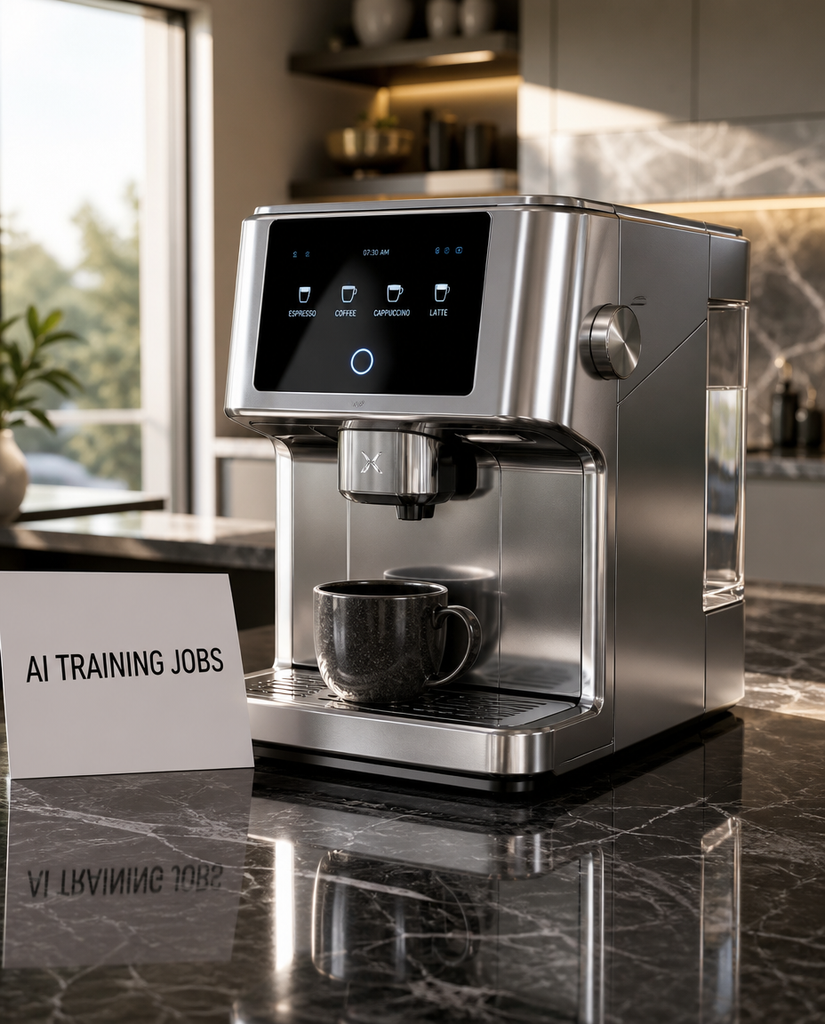
Getimg Auto mode selected GPT Image 2 for our first product photography test.
The first result was impressive.
The coffee machine looked convincingly photorealistic, the metallic surfaces and reflections were handled well, and the overall composition resembled a polished commercial product photograph.
More importantly, the requested “AI TRAINING JOBS” text appeared correctly on the card on the first attempt.
Smaller text generated on the coffee machine’s own interface was less reliable, with some of the distortions that remain common in AI-generated imagery.
But the primary text explicitly requested in our prompt was rendered correctly.
Is Getimg Auto Mode Useful?
For new users, Auto may be one of Getimg’s most useful features.
One of the problems created by multi-model platforms is that model choice itself can become complicated. Giving users dozens of models doesn’t necessarily help if they don’t know which one is appropriate for a particular task.
Getimg’s approach is to make that decision optional.
Its Auto system can select the model and settings according to the requested task, while experienced users remain free to choose a model manually.
In our first test, it worked well: GPT Image 2 was a sensible choice for a prompt involving photorealistic product imagery and accurate text.
Tests 2–4: Comparing Getimg AI Image Models
Next, we manually selected different image models and gave them the same core prompt.
We tested:
- Seedream 5.0 Pro
- Nano Banana 2
- Nano Banana Pro
This wasn’t intended to be a scientific benchmark.
Generative outputs naturally vary between runs, and individual models can support different settings, resolutions and output formats.
Instead, we wanted to answer a more practical question: does switching models inside Getimg actually produce meaningfully different creative options?
It does.
Seedream 5.0 Pro
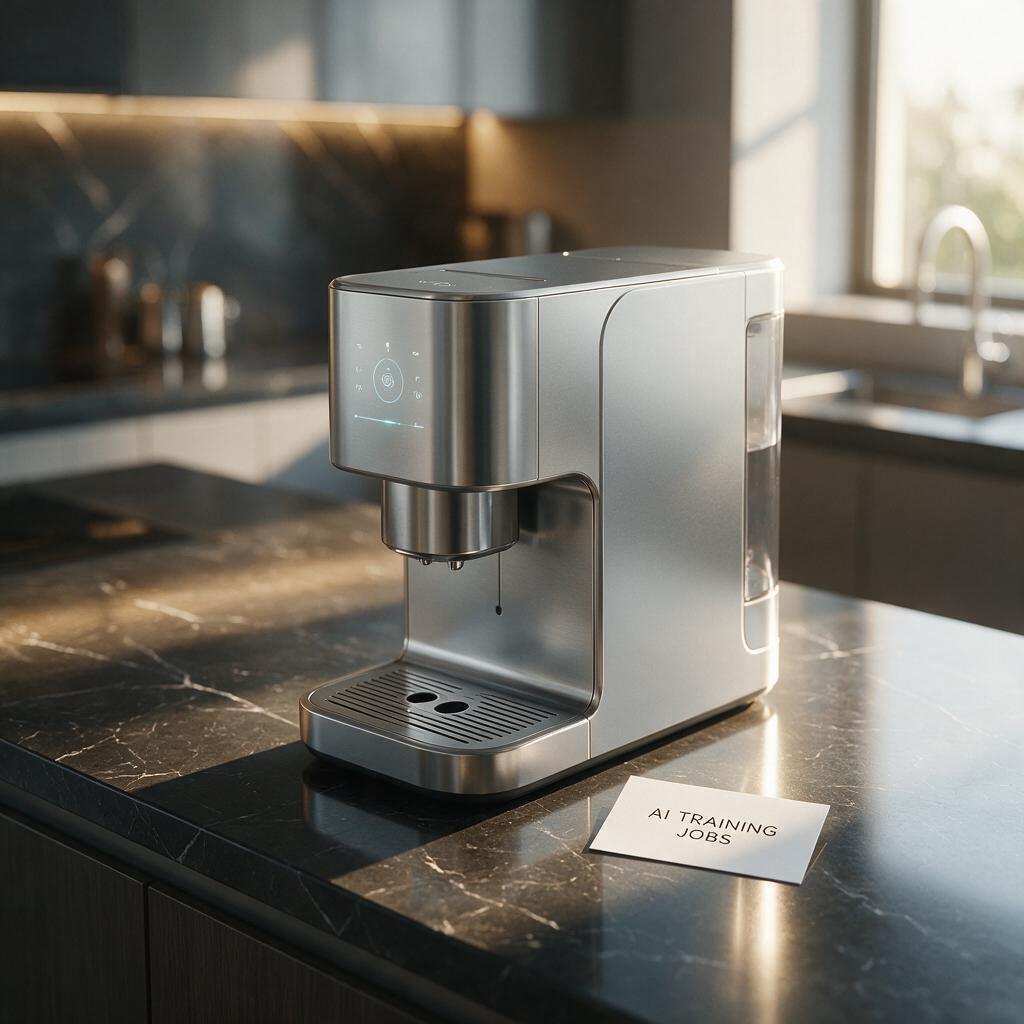
Seedream 5.0 Pro interpretation of our coffee machine prompt.
Seedream 5.0 Pro produced the most minimal interpretation of the product in our test.
The lighting was attractive and the image had a clean, editorial quality. The coffee machine itself was considerably simpler than the versions generated by some of the other models.
The requested text was recognizable, although its presentation was less prominent than in some of our other results.
Overall, the result was aesthetically strong but noticeably different from the GPT Image interpretation.
That is a good illustration of why model choice can matter even when the underlying prompt remains essentially unchanged.
Nano Banana 2
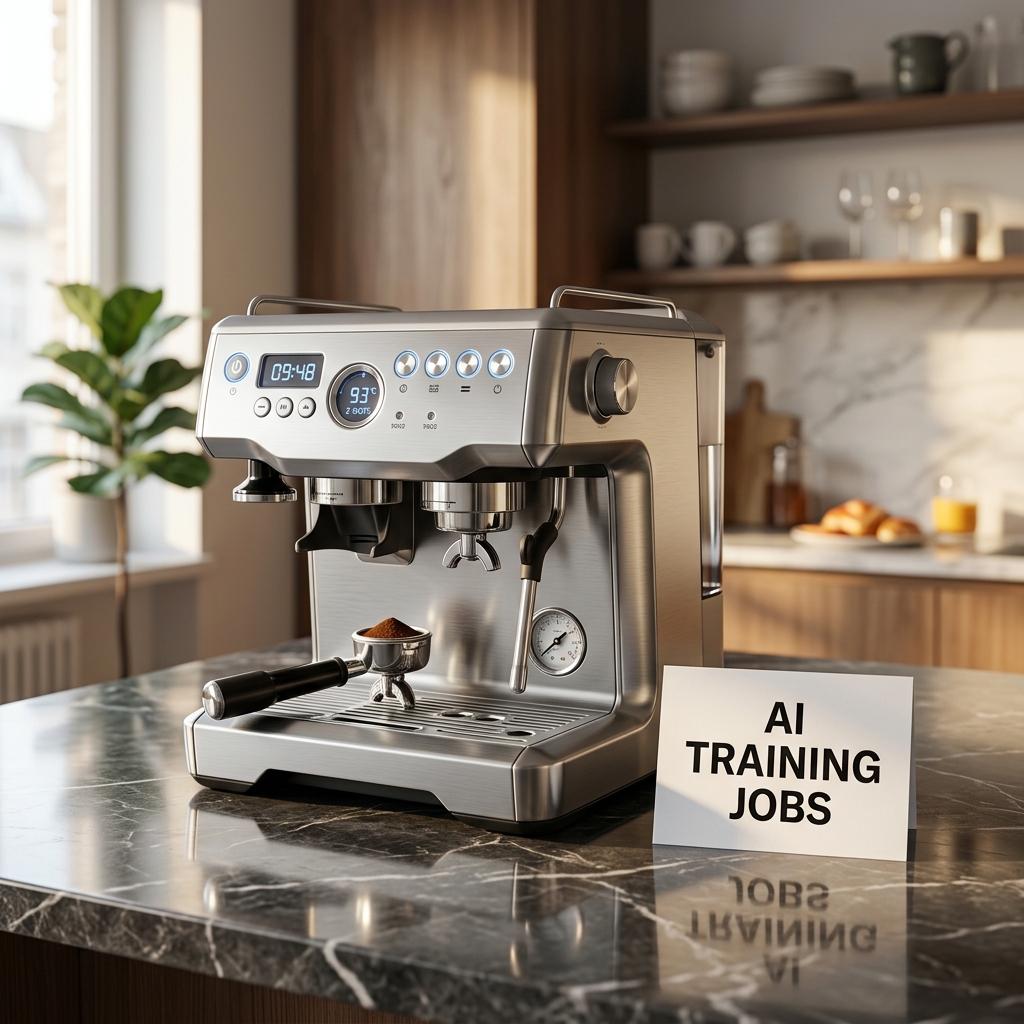
Nano Banana 2 produced a more detailed interpretation of the same product photography prompt.
Nano Banana 2 went in the opposite direction.
Its coffee machine contained more controls, components and visual details, while the “AI TRAINING JOBS” text was rendered clearly and accurately.
The scene also remained convincingly photorealistic.
Some of the tiny interface details on the machine became less convincing when examined closely, but the primary requested text was excellent.
Of the images we generated, this was one of our favorite results for this particular prompt.
Nano Banana Pro
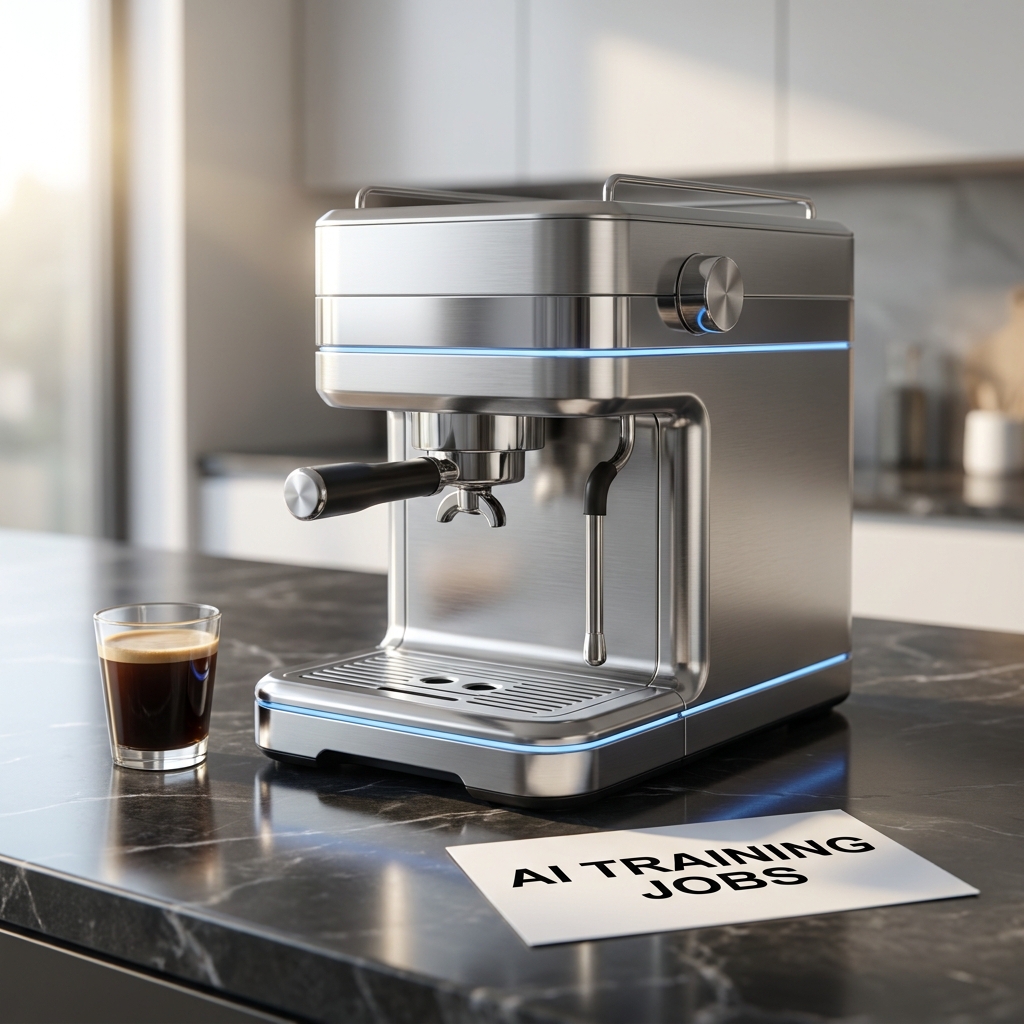
Nano Banana Pro created a cleaner, more futuristic interpretation with excellent primary text rendering.
Nano Banana Pro produced yet another interpretation.
Its coffee machine was cleaner and more futuristic, with a minimalist metallic design and distinctive blue accent lighting.
Text rendering was again excellent.
Interestingly, we wouldn’t automatically say that the Pro result was better than Nano Banana 2 for this particular assignment.
Nano Banana 2 produced a busier and arguably more interesting commercial product image, while Nano Banana Pro gave us something cleaner and more controlled.
That distinction matters.
A model with “Pro” in its name won’t necessarily produce the image you personally prefer for every prompt. Different models have different strengths, styles and interpretations.
Being able to move between them easily is therefore more useful than simply having access to one supposedly “best” image model.
Test 5: Editing a Nano Banana Pro Image with Nano Banana 2
This was one of the most interesting parts of our test.
Instead of starting again from scratch, we took our Nano Banana Pro image and used it as a reference for another generation.
We asked Getimg to keep the coffee machine and the “AI TRAINING JOBS” card while transforming the bright kitchen into a stylish coffee shop at night.
We also deliberately switched models, using Nano Banana 2 for the edit.
Before
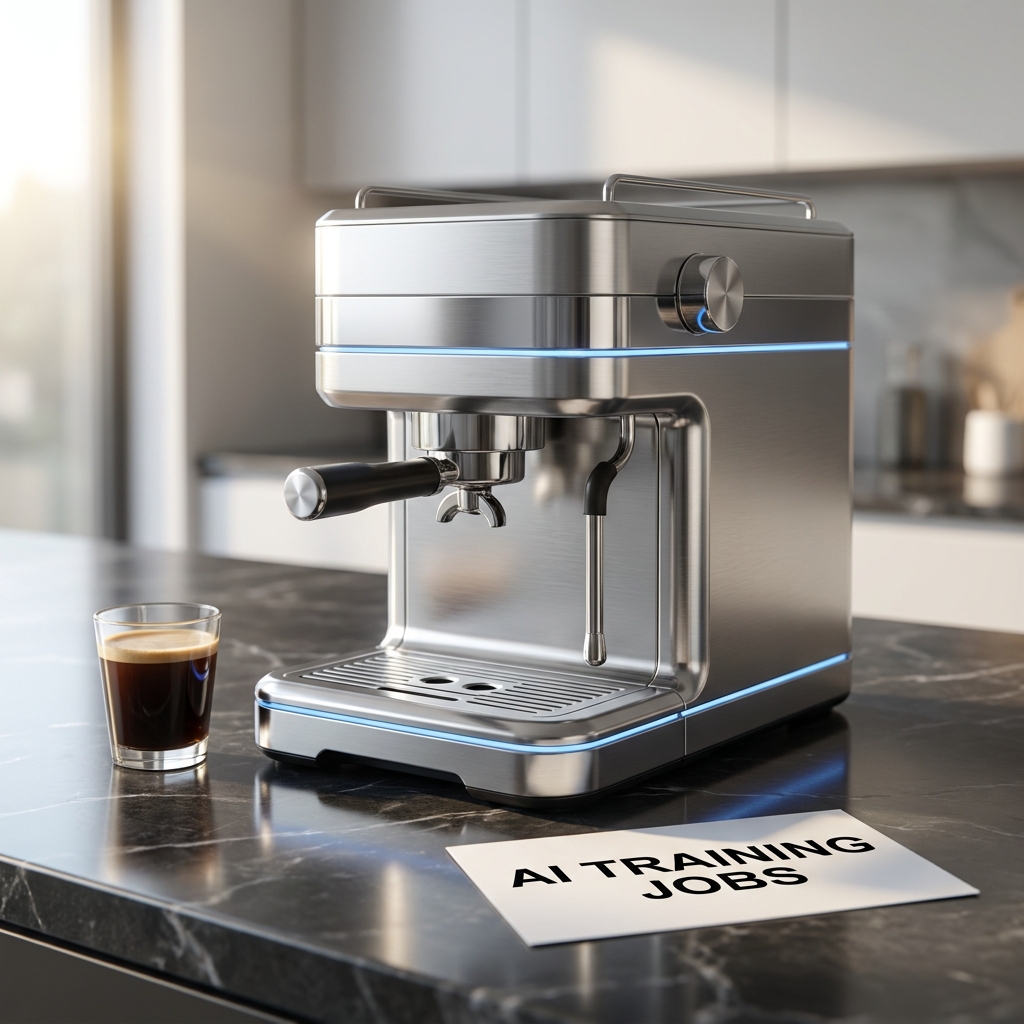
Original image generated with Nano Banana Pro.
After
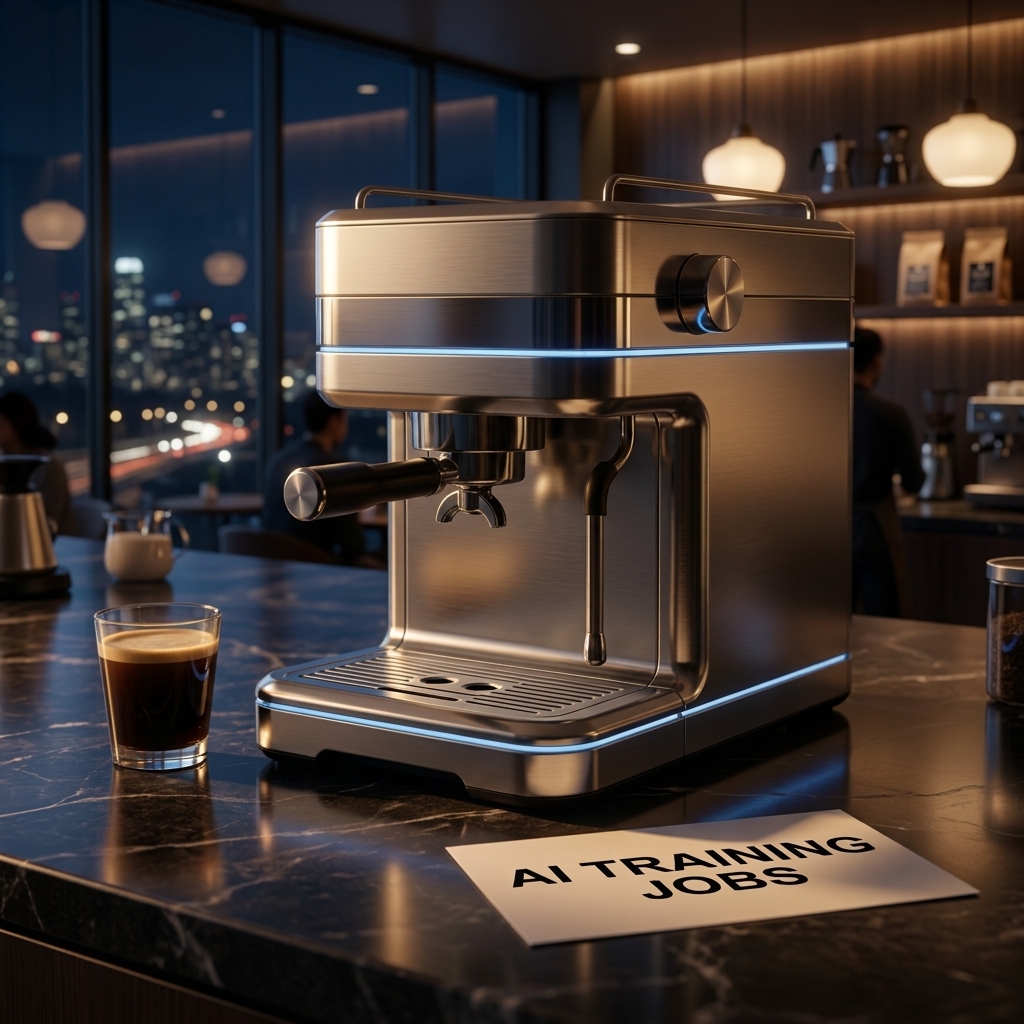
The same concept after using the original image as a reference and editing it with Nano Banana 2.
The result was excellent.
The environment changed substantially. The bright daytime kitchen became a dark coffee shop with warm ambient lighting, large windows and city lights in the background.
At the same time, the main product remained remarkably consistent.
The overall design of the coffee machine, its large control knob, portafilter, metallic finish and blue accent lighting were retained. The card also remained in the composition, with “AI TRAINING JOBS” still clearly readable.
The model didn’t simply replace the background.
Lighting and reflections across the metallic product were also adapted to the nighttime environment, making the final image feel reasonably coherent as a complete scene.
Why This Was Our Most Important Image Test
This is where Getimg’s multi-model approach started to make more practical sense.
We were no longer simply generating isolated images and comparing them.
We had created an asset with one model and then continued working on it using another model inside the same platform.
For actual creative work, that may be more important than which individual model wins a one-off image comparison.
Test 6: Image-to-Video with MiniMax H3
Finally, we took the edited nighttime image and turned it into a video.
For this test, we manually selected MiniMax H3.
We asked for a slow cinematic camera movement toward the coffee machine, subtle movement in the background and realistic reflections across the stainless-steel surface while preserving the product and the text.
Our final image-to-video test using MiniMax H3 inside Getimg.
The resulting clip was approximately five seconds long.
The coffee machine remained surprisingly stable during the animation, without major structural deformation.
Camera movement was controlled, while the changing reflections across the metal helped the result feel more like a short commercial product shot than a static image with artificial movement added on top.
The “AI TRAINING JOBS” text also remained recognizable and readable.
Preservation wasn’t pixel-perfect. Some elements of the original image were naturally reinterpreted as the frame was animated.
But overall consistency was good.
This completed a workflow that started with a simple text prompt and ended with a short product video — without leaving Getimg.
The Real Strength of Getimg: Cross-Model Workflows
After testing the platform, its biggest advantage became clearer.
It isn’t simply that Getimg offers access to many AI models.
Several platforms now aggregate generative AI models.
What we found more useful was being able to move through a workflow like this:
Prompt → Image Generation → Alternative Models → Image Editing → Image-to-Video
During our test, we moved between GPT Image 2, Seedream 5.0 Pro, Nano Banana 2, Nano Banana Pro and MiniMax H3.
The important part wasn’t simply being able to select those models from a menu.
It was being able to continue working on the resulting assets inside the same environment.
What We Liked About Getimg
Access to Multiple Models Without Multiple Workflows
Working directly with models from several different providers can mean using different websites, interfaces, subscriptions and credit systems.
Getimg places multiple models behind a consistent interface.
For creators who regularly switch between models, that is a meaningful convenience.
Auto Mode Is Actually Useful
Auto could easily have been a superficial feature.
Our experience was more positive.
For our first prompt, Getimg selected GPT Image 2 and immediately produced one of the strongest results of the test.
At the same time, manual model selection remains available when you want more control.
That gives Getimg a sensible balance between simplicity and experimentation.
Cross-Model Editing Worked Well
Our favorite workflow wasn’t the initial image generation.
It was generating an asset with Nano Banana Pro, editing that asset with Nano Banana 2 and then animating the resulting image with MiniMax H3.
That’s a much better demonstration of an all-in-one AI platform than simply displaying a long list of supported models.
The Interface Is Straightforward
Getimg doesn’t require users to construct complicated node-based workflows.
The major creation tools are easy to find, including image generation, video generation, image and video upscaling, resizing, background removal, music and speech.
That makes the platform approachable for creators who want to move quickly between tasks.
What Could Be Better?
Getimg doesn’t eliminate the limitations of the underlying generative AI models.
We still encountered some familiar issues during testing.
Small AI-Generated Text Can Still Be Unreliable
Our main “AI TRAINING JOBS” text performed surprisingly well.
However, some models independently generated small interface labels and controls on the coffee machine itself.
Those tiny details weren’t always convincing and occasionally contained distorted or meaningless text.
This varied by model, but it’s something worth checking carefully before using an AI-generated image as a final commercial asset.
Credit Consumption Varies Significantly
Getimg uses credits for generation, but a credit does not represent a fixed number of images or videos.
Consumption varies according to the model, resolution and type of generation.
That became particularly noticeable when moving from image generation to video.
The interface shows the credit requirement for a generation, so users experimenting with premium models or video should pay attention to the cost before clicking Generate.
This is especially important if you enjoy comparing several models against the same prompt.
An All-in-One Platform Won’t Always Offer the Deepest Native Controls
There is an unavoidable trade-off with platforms of this kind.
If you use one specific AI model every day and need every advanced parameter or provider-specific feature available for that model, its native platform may sometimes provide deeper controls.
Getimg’s advantage is different:
breadth, convenience and workflow continuity across models.
Which matters more depends on the way you work.
Other Getimg Features
Our hands-on testing focused primarily on image generation, image editing and image-to-video.
Getimg also provides additional creative tools, including image and video upscaling, smart image resizing, background removal, music generation and text-to-speech.
We didn’t test those tools extensively enough for this review to make claims about their output quality.
That’s an important distinction: they expand what can be done inside the Getimg workspace, but our assessment in this review is based primarily on the workflows we actually tested.
Getimg API for Developers
Getimg also operates a separate developer API.
At the time of writing, the API advertises:
- 33+ production models
- 7 model providers
- 17 image models
- 16 video models
- 1M+ generations daily
The image API includes models such as GPT Image, Nano Banana, Seedream, Qwen Image and others.
The video API includes models from families such as Kling, Seedance, Wan, Grok Imagine and MiniMax.
Instead of requiring a separate integration for every provider, developers can access these models through Getimg’s unified API.
API pricing is separate from the consumer subscriptions and uses pay-as-you-go billing.
Current API pricing starts from $0.015 per image and $0.022 per second of video, although actual prices vary significantly depending on the selected model, resolution and other settings.
For individual creators, the API may not be particularly important.
For agencies, startups and products that need to programmatically access several generative models, it substantially expands Getimg’s potential use cases.
Who Is Getimg Best For?
Based on our testing, Getimg makes the most sense for people who want to use multiple generative AI models rather than committing their entire workflow to one provider.
It is particularly relevant for:
- creators experimenting with different image and video models;
- marketers producing visual and social content;
- freelancers who don’t want separate workflows for every model;
- e-commerce teams working with product imagery;
- small creative teams;
- developers looking for multi-model access through an API.
Someone who primarily uses one specific model and wants its deepest native controls may have less reason to use an aggregation platform.
But the more your workflow crosses models and media types, the stronger Getimg’s proposition becomes.
Getimg.ai Review: Final Verdict
Our hands-on testing changed the way we think about Getimg.
The obvious way to describe the platform is as a place where you can access many AI models.
That’s true, but it undersells the more interesting part.
During our test, Getimg automatically selected GPT Image 2 for our first image, let us compare the result with Seedream and Nano Banana models, allowed us to continue working on an existing asset using a different model, and finally turned that edited image into a video with MiniMax H3.
We never needed to leave the platform.
The individual models still had their own strengths and weaknesses.
We saw meaningful differences in product design, text rendering and visual style, and the model with the most premium-sounding name didn’t automatically produce our favorite result.
That is precisely why the multi-model approach can be useful.
Instead of trying to decide which AI model is universally “best,” Getimg lets creators choose different models according to the task — or let Auto make that choice for them.
For users who regularly work across AI images, editing and video, that convenience is meaningful.
Getimg isn’t a replacement for every specialist AI tool, and users who need the deepest possible controls around a single model may still prefer its native platform.
But as an accessible way to combine multiple leading generative models and continue working across them in one environment, Getimg is one of the more complete all-in-one AI creative platforms we’ve tested in 2026.
Leave a Reply